# Update on Saheb Development Plan

### Purpose of This Documentation

> This presentation covers sections that required further research.

### Key Points

This is the list of topics we will cover:

1. 1. **Local-First App Architecture**
    2. **Handling Local Notifications**
    3. **Auth Flow (Web And Mobile)**
    4. **Database Technology**
    5. **Logging Security and Strategy**
    6. <s>**Processing Tasks with BullMQ in NestJS**</s>
    7. <s>**OneSignal or Expo**</s>
    8. **Versioning Strategy**
    9. **Crash Reporting (Sentry)**
    10. **Styling**
    11. <span style="color: rgb(224, 62, 45);">**Saving initial data localy?**</span>

### **1. Local-First App Architecture**

> Local-first apps keep data locally, only using the cloud to synchronize data between machines (or peer‑to‑peer) and it prioritizes storing and manipulating data in a <span class="Yjhzub">local database</span> on the user's device

##### **Choice**: **WatermelonDB (SQLite-based)**

##### **Why**

1. 1. **Offline-First by Design**
        - a high-performance database built on top of SQLite, specifically designed for **offline-first and sync-based mobile applications**.
        - stores all application data **locally on the user’s device** using SQLite.
        - The application remains fully usable without any internet connection.
        - All reads and writes happen locally.
        - Network availability does not block user actions.
    2. **Synchronization**
        - provides a **manual synchronization mechanism** based on two explicit phases:
            
            
            - **Push local changes** to the backend
            - **Pull remote changes** from the backend
    3. WatermelonDB does **not impose any backend technology,** it means u can use it with any backend technology

##### **Setup Example**

**`database.ts`**

```typescript
import { Database } from '@nozbe/watermelondb';
import SQLiteAdapter from '@nozbe/watermelondb/adapters/sqlite';
import { schema } from './schema';
import { Note } from './note.model';

const adapter = new SQLiteAdapter({
  schema,
});

export const database = new Database({
  adapter,
  modelClasses: [Note],
});
```

`schema.ts`

```typescript
import { appSchema, tableSchema } from '@nozbe/watermelondb';

export const schema = appSchema({
  version: 1,
  tables: [
    tableSchema({
      name: 'notes',
      columns: [
        { name: 'title', type: 'string' },
        { name: 'content', type: 'string' },
        { name: 'updated_at', type: 'number' },
        { name: 'deleted_at', type: 'number', isOptional: true },
      ],
    }),
  ],
});

```

`note.model.ts`

```typescript
import { Model } from '@nozbe/watermelondb';
import { field } from '@nozbe/watermelondb/decorators';

export class Note extends Model {
  static table = 'notes';

  @field('title') title!: string;
  @field('content') content!: string;
  @field('updated_at') updatedAt!: number;
  @field('deleted_at') deletedAt?: number;
}

```

`sync.ts`

```typescript
import { synchronize } from '@nozbe/watermelondb/sync'

async function mySync() {
  await synchronize({
    database,
    pullChanges: async ({ lastPulledAt, schemaVersion, migration }) => {
      const urlParams = `last_pulled_at=${lastPulledAt}&schema_version=${schemaVersion}&migration=${encodeURIComponent(
        JSON.stringify(migration),
      )}`
      const response = await fetch(`https://my.backend/sync?${urlParams}`)
      if (!response.ok) {
        throw new Error(await response.text())
      }

      const { changes, timestamp } = await response.json()
      return { changes, timestamp }
    },
    pushChanges: async ({ changes, lastPulledAt }) => {
      const response = await fetch(`https://my.backend/sync?last_pulled_at=${lastPulledAt}`, {
        method: 'POST',
        body: JSON.stringify(changes),
      })
      if (!response.ok) {
        throw new Error(await response.text())
      }
    },
    migrationsEnabledAtVersion: 1,
  })
}
```

##### Usage

**Quick (over-simplified) example:** an app with posts and comments.

First, you define Models:

```typescript
class Post extends Model {
  @field('name') name
  @field('body') body
  @children('comments') comments
}

class Comment extends Model {
  @field('body') body
  @field('author') author
}

```

```js
const Post = ({ postId }) => (
  <View>
    <Text>{post.name}</Text>
    <Text>Comments:</Text>
    {comments.map(comment =>
      <EnhancedComment key={comment.id} comment={comment} />
    )}
  </View>
)

const enhance = withObservables(['post'], ({ postId }) => ({
  post: database.collections.get('posts').findAndObserve(postId),
  comments: post.comments
}))
```

And now you can render the whole Post:

<div class="language-js codeBlockContainer_Ckt0 theme-code-block" id="bkmrk-" style="--prism-color: #393A34; --prism-background-color: #f6f8fa;"><div class="codeBlockContent_biex"><div class="buttonGroup__atx">- if **post changes**, it re-renders
- if **comments change**, it re-renders too

  
</div></div></div>Then, you connect components to the data:

```typescript
const Comment = ({ comment }) => (
  <View style={styles.commentBox}>
    <Text>{comment.body} — by {comment.author}</Text>
  </View>
)

// This is how you make your app reactive! ✨
const enhance = withObservables(['comment'], ({ comment }) => ({
  comment,
}))
const EnhancedComment = enhance(Comment)

```

Whenever `comment` changes in the database, **`EnhancedComment` automatically re-renders** with the new data.

##### **Implementing the Sync Backend**

##### Understanding the `changes` Object

WatermelonDB synchronizes data using a **table-based changes object**.

Each table contains three arrays:

- - `created`: newly created records
    - `updated`: updated records
    - `deleted`: IDs of deleted records only

##### Example `changes` Object

<div class="absolute end-0 bottom-0 flex h-9 items-center pe-2" id="bkmrk--1"></div>```json
{
  "notes": {
    "created": [
      { "id": "n1", "title": "Todo", "content": "Buy milk", "updated_at": 1700000000 }
    ],
    "updated": [
      { "id": "n2", "title": "Ideas", "content": "Startup idea", "updated_at": 1700000100 }
    ],
    "deleted": ["n3"]
  }
}

```

### **2. Handling Local Notifications**

##### Notification Types

There are two main types of notifications in mobile applications:

**Local Notifications**

- - Triggered directly on the device.
    - Do not require an internet connection.

**Push Notifications**

- - Sent from a remote server.
    - Require internet connectivity.

**Current Choice:** Local Notifications Only

- - For the current scope of the application, **we only require local notifications**.

**why**

- - The application must work **fully offline**.
    - No dependency on backend availability.

**Background Notification Handling (Prayer Time Example)**

Some notifications, such as **prayer time reminders**, must be triggered even when the application is not actively running.

To handle this, we use:

**Expo Task Manager**

- - Runs background tasks on the device.
    - Allows scheduling logic to execute even when the app is closed.

Example use case:

- - A background task calculates the next prayer times.
    - Local notifications are scheduled accordingly.
    - The user receives reminders on time, even offline.

<section class="markdown-section chat-fade-in" data-markdown-raw="

## 3. Auth Flow (Web and Mobile)" data-section-index="2" id="bkmrk-3.-auth-flow-%28web-an">### **3. Auth Flow (Web and Mobile)**

</section><section class="markdown-section chat-fade-in" data-markdown-raw="

### Overview" data-section-index="3" id="bkmrk-overview">### Overview

</section><section class="markdown-section chat-fade-in" data-markdown-raw="
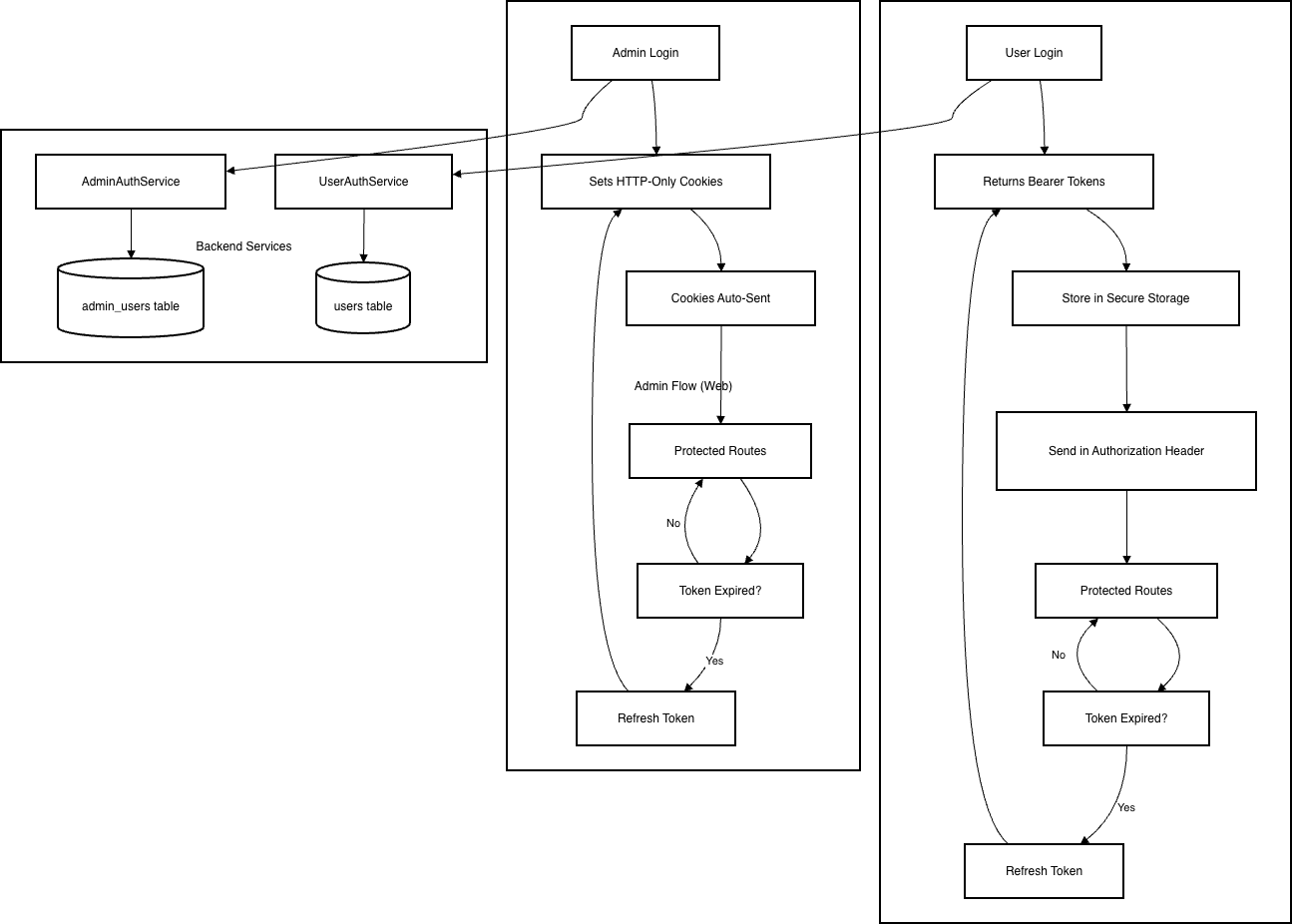
The authentication system uses separate flows for end users and admins. Each flow is isolated and independent." data-section-index="5" id="bkmrk-the-authentication-s">The authentication system uses separate flows for end users and admins. Each flow is isolated and independent.</section><section class="markdown-section chat-fade-in" data-markdown-raw="

### How the Flows Are Separated" data-section-index="6" id="bkmrk-how-the-flows-are-se">### How the Flows Are Separated

</section><section class="markdown-section chat-fade-in" data-markdown-raw="

#### 1. **Separate API Endpoints**" data-section-index="7" id="bkmrk-1.%C2%A0separate-api-endp">#### 1. <span class="markdown-bold-text">Separate API Endpoints</span>

</section><section class="markdown-section chat-fade-in" data-markdown-raw="

- **End Users**: All endpoints under `/auth/user/*`
  - `/auth/user/signin`
  - `/auth/user/me`
  - `/auth/user/signout`
  - etc." data-section-index="8" id="bkmrk-end-users%3A%C2%A0all-endpo">- **<span class="markdown-bold-text">End Users</span>: All endpoints under <span class="markdown-inline-code leading-[1.4]">/auth/user/\*</span>**

- - `<span class="markdown-inline-code leading-[1.4]">/auth/user/signin</span>`

- - `<span class="markdown-inline-code leading-[1.4]">/auth/user/me</span>`

- - `<span class="markdown-inline-code leading-[1.4]">/auth/user/signout</span>`

- - etc.

</section><section class="markdown-section chat-fade-in" data-markdown-raw="

- **Admins**: All endpoints under `/auth/admin/*`
  - `/auth/admin/signin`
  - `/auth/admin/me`
  - `/auth/admin/signout`
  - etc." data-section-index="9" id="bkmrk-admins%3A-all%C2%A0endpoint">- **<span class="markdown-bold-text">Admins</span>: All endpoints under <span class="markdown-inline-code leading-[1.4]">/auth/admin/\*</span>**

- - `<span class="markdown-inline-code leading-[1.4]">/auth/admin/signin</span>`

- - `<span class="markdown-inline-code leading-[1.4]">/auth/admin/me</span>`

- - `<span class="markdown-inline-code leading-[1.4]">/auth/admin/signout</span>`

- - etc.

</section><section class="markdown-section chat-fade-in" data-markdown-raw="

#### 2. **Separate Database Tables**" data-section-index="10" id="bkmrk-2.%C2%A0separate%C2%A0database">#### 2. <span class="markdown-bold-text">Separate Database Tables</span>

</section><section class="markdown-section chat-fade-in" data-markdown-raw="

- **End Users**: Stored in `users` table
- **Admins**: Stored in `admin_users` table" data-section-index="11" id="bkmrk-end-users%3A-stored-in">- <span class="markdown-bold-text">End Users</span>: Stored in **<span class="markdown-inline-code leading-[1.4]">users</span> table**

- <span class="markdown-bold-text">Admins</span>: Stored in **<span class="markdown-inline-code leading-[1.4]">admin\_users</span> table**

</section><section class="markdown-section chat-fade-in" data-markdown-raw="
No shared data between the two." data-section-index="13" id="bkmrk-no-shared-data-betwe">No shared data between the two.</section><section class="markdown-section chat-fade-in" data-markdown-raw="

#### 3. **Separate JWT Secrets**" data-section-index="14" id="bkmrk-3.%C2%A0separate-jwt-secr">#### 3. <span class="markdown-bold-text">Separate JWT Secrets</span>

</section><section class="markdown-section chat-fade-in" data-markdown-raw="

- **End Users**: Use `USER_JWT_ACCESS_SECRET` and `USER_JWT_REFRESH_SECRET`
- **Admins**: Use `ADMIN_JWT_ACCESS_SECRET` and `ADMIN_JWT_REFRESH_SECRET`" data-section-index="15" id="bkmrk-end-users%3A-use%C2%A0user_">- <span class="markdown-bold-text">End Users</span>: Use **<span class="markdown-inline-code leading-[1.4]">USER\_JWT\_ACCESS\_SECRET</span>** and **<span class="markdown-inline-code leading-[1.4]">USER\_JWT\_REFRESH\_SECRET</span>**

- <span class="markdown-bold-text">Admins</span>: Use **<span class="markdown-inline-code leading-[1.4]">ADMIN\_JWT\_ACCESS\_SECRET</span>** and **<span class="markdown-inline-code leading-[1.4]">ADMIN\_JWT\_REFRESH\_SECRET</span>**

</section><section class="markdown-section chat-fade-in" data-markdown-raw="
Tokens from one flow cannot be used in the other." data-section-index="17" id="bkmrk-tokens-from-one-flow">Tokens from one flow cannot be used in the other.</section><section class="markdown-section chat-fade-in" data-markdown-raw="

#### 4. **Different Authentication Methods**" data-section-index="18" id="bkmrk-4.%C2%A0different-authent">#### 4. <span class="markdown-bold-text">Different Authentication Methods</span>

</section><section class="markdown-section chat-fade-in" data-markdown-raw="

- **Admins (Web)**: HTTP-only cookie authentication
  - Tokens stored in secure HTTP-only cookies
  - Cookies automatically sent with requests
  - Cookies named `AdminAuthentication` and `AdminRefresh`
  - Web-optimized security" data-section-index="20" id="bkmrk-end-users-%28mobile%29%3A-">- **<span class="markdown-bold-text">End Users (Mobile): Bearer token authentication.</span>**
- <span class="markdown-bold-text">Tokens returned in response body after login </span>
- <span class="markdown-bold-text">Access token sent in `Authorization: Bearer <token>` header </span>
- <span class="markdown-bold-text">Refresh token sent in request body when refreshing Mobile-friendly (no cookie dependency)</span>

- **<span class="markdown-bold-text">Admins (Web)</span>: HTTP-only cookie authentication**
- Tokens stored in secure HTTP-only cookies
- Cookies automatically sent with requests
- Cookies named `AdminAuthentication` and `AdminRefresh `
- Web-optimized security

#### 5. Complete Authentication Architecture Overview

<div drawio-diagram="386"><img src="https://italiano.embouzkoura.space/uploads/images/drawio/2026-01/drawing-1-1768318029.png" alt=""/></div>

</section><section class="markdown-section chat-fade-in" data-markdown-raw="

### Why This Separation Matters" data-section-index="25" id="bkmrk--5"></section>---

### 4. **Database Technology**

##### **Choice:** **PostgreSQL**

##### **Why**

- - Our data is **structured**, not dynamic, so a relational DB fits naturally.
    - We are using SqliteDB on mobile app, so it will be easier to sync the data (Both dbs are SQL)
    - We have **complex queries**, especially in the **database translation system**, which benefit from SQL capabilities.
    - Strong support for **views** and **transactions** ensures data consistency and simplifies reporting or multi-step operations

##### **PostgresSQL (SQL) VS MongoDB (NoSQL)**

Based on this [amazon](https://aws.amazon.com/compare/the-difference-between-mongodb-and-postgresql/) article this is the key differences

##### **PostgresSQL vs Mysql Benchmarks**

A greate video by [Anton Putra](https://www.youtube.com/watch?v=R7jBtnrUmYI) called MySQL vs PostgreSQL Performance Benchmark.

**First Benchmark overview (INSERT, SELECT)**

**[![Screenshot 2026-01-07 at 11.17.01.png](https://italiano.embouzkoura.space/uploads/images/gallery/2026-01/scaled-1680-/screenshot-2026-01-07-at-11-17-01.png)](https://italiano.embouzkoura.space/uploads/images/gallery/2026-01/screenshot-2026-01-07-at-11-17-01.png)**

**Second Benchmark overview (Read Latency, Finding a Record and Joining Tables)**

[![Screenshot 2026-01-07 at 11.23.25.png](https://italiano.embouzkoura.space/uploads/images/gallery/2026-01/scaled-1680-/screenshot-2026-01-07-at-11-23-25.png)](https://italiano.embouzkoura.space/uploads/images/gallery/2026-01/screenshot-2026-01-07-at-11-23-25.png)

<p class="callout info">**to see each graph details please see the [Anton Putra](https://www.youtube.com/watch?v=R7jBtnrUmYI) video.**</p>

### **5. Logging Security and Strategies**

based on this beautiful [article](https://betterstack.com/community/guides/logging/logging-best-practices/#12-don-t-rely-on-logs-for-monitoring) these are the Logging Security and Strategies:

1. ##### Establish Clear Logging Objectives
    
    
    - Decide **why you are logging:** what problems or goals are you trying to track.
    - Decide **what to log:** don’t try to log everything.
    - Make logs **useful**: for errors, include the error and the events leading up to it so issues can be fixed quickly.
2. ##### Do use log levels correctly
    
    
    - Here's a summary of common levels and how they're typically used:
        
        
        - `INFO`: noteworthy business events.
        - `WARN`: Abnormal situations that may indicate future problems.
        - `ERROR`: errors that affect a specific operation.
        - `FATAL`: errors that affect the entire program.
3. ##### Do write meaningful log entries
    
    
    - Here's an example of a log entry without sufficient context:
        
        <div class="relative mb-5 bg-neutral-40 border border-neutral-50 rounded-md text-[15px] shadow-2xs" data-controller="clipboard"><div class="px-4 py-[6px] bg-white flex items-center rounded-t-md"><div class="text-[15px] font-medium inline align-middle grow"><span class="text-app-small"> </span></div><div class="copy-button hidden sm:flex sm:items-center" data-clipboard-target="confirmation"><button class="text-sm p-1" data-action="click->clipboard#copy"><svg alt="copy code to clipboard" class="m-0" height="18" width="18"></svg></button></div></div><div class="code-wrapper overflow-x-auto p-2 rounded json" data-clipboard-target="content" data-controller="code">  
        </div></div>```json
        {
          "timestamp": "2023-11-06T14:52:43.123Z",
          "level": "INFO",
          "message": "Login attempt failed"
        }
        
        ```
        
        And here's one with just enough details to piece together who performed the action, why the failure occurred, and other meaningful contextual data.
        
        <div class="relative mb-5 bg-neutral-40 border border-neutral-50 rounded-md text-[15px] shadow-2xs" data-controller="clipboard"><div class="px-4 py-[6px] bg-white flex items-center rounded-t-md"><div class="text-[15px] font-medium inline align-middle grow"><span class="text-app-small"> </span></div></div><div class="code-wrapper overflow-x-auto p-2 rounded json" data-clipboard-target="content" data-controller="code">  
        </div></div>```json
        {
          "timestamp": "2023-11-06T14:52:43.123Z",
          "level": "INFO",
          "message": "Login attempt failed due to incorrect password",
          "user_id": "12345",
          "source_ip": "192.168.1.25",
          "attempt_num": 3,
          "request_id": "xyz-request-456",
          "service": "user-authentication",
          "device_info": "iPhone 12; iOS 16.1",
          "location": "New York, NY"
        }
        
        ```
4. ##### Protect Logs and Sensitive Information
    
    
    - The mishandling of sensitive information in logs can have severe repercussions, as exemplified by the incidents at Twitter and GitHub in 2018.
    - **Do not log sensitive data**: passwords, API tokens, session tokens, credit card numbers, Social Security numbers, personal emails, etc.
    - **Log references or IDs instead:** for example, log a user ID instead of the email or password.
    - Example: Instead of logging the full password:
        
        
        - ```json
            { "userId": "user-123", "password": "********" }
            ```
    - log only the user ID to identify the record: 
        - ```json
            { "userId": "user-123", "action": "login_failed" }
            ```

### <s>**6. Processing Tasks with BullMQ in NestJS**</s>

We need to perform background tasks, like sending prayer time notifications for example. **BullMQ** lets you offload work to a **worker process** so your main server stays responsive.

---

#### **How the Process Works**

#### **1. A job is created (produced)**

- Your NestJS server decides that a task needs to happen (e.g., notify a user).
- You add the job to a queue:

```typescript
await this.prayerQueue.add('notify', { userId: 'user-123', prayerName: 'Fajr', time: '05:30', });
```

<div class="contain-inline-size rounded-2xl corner-superellipse/1.1 relative bg-token-sidebar-surface-primary" id="bkmrk-at-this-point%2C-the-j"><div class="sticky top-[calc(--spacing(9)+var(--header-height))] @w-xl/main:top-9"><div class="absolute end-0 bottom-0 flex h-9 items-center pe-2"><div class="bg-token-bg-elevated-secondary text-token-text-secondary flex items-center gap-4 rounded-sm px-2 font-sans text-xs">At this point, the job is **stored in Redis** (BullMQ’s backend).</div></div></div></div>---

#### **2. The job waits in the queue**

- Jobs remain in the queue until a **worker process** is ready to process them.
- This ensures the **main server is never blocked**, even if many jobs are created at once.

---

#### **3. Single Worker Picks Up the Job**

- A **worker process** subscribes to the queue and executes jobs asynchronously:
- ```typescript
    @Processor('prayerQueue')
    export class PrayerProcessor extends WorkerHost {
      async process(job: Job) {
        const { userId, prayerName, time } = job.data;
        console.log(`Sending prayer notification to ${userId}: ${prayerName} at ${time}`);
        // Push notification logic here
      }
    }
    
    ```
- Each job is processed **independently**, without blocking the main Node.js event loop.

---

#### **4. Job Completion**

- Once the worker finishes, BullMQ marks the job as **completed** in Redis.
- Failed jobs can **retry automatically** based on configuration.

---

##### **Single-Worker Approach**

- The **worker runs in the same server process** as your main NestJS application.
- This setup is **simple and easy to implement**, and is fine for **low to moderate workloads**.

**Limitation:**

- If thousands of jobs arrive at once or jobs are heavy (CPU-intensive tasks, multiple API calls), a single worker can become a bottleneck.
- Even though Node.js is non-blocking for I/O, the worker still handles jobs **one at a time** by default, and processing may take longer if overloaded.

---

##### **Scaling with Multiple Workers**

- To handle **high volumes of jobs**, you can run **additional worker processes** On separate servers or containers.
- BullMQ **automatically distributes jobs across all workers** connected to the same queue.
    
    
    - If 200k jobs are queued, each worker **pulls jobs one by one**, balancing the workload.
    - This ensures the main server remains responsive and all jobs are processed efficiently.
- We can have:
    
    
    1. **Main NestJS server**
        
        
        - Handles HTTP requests
        - Adds jobs to the queue
        - Optionally runs a **worker** for background tasks
    2. **Separate Worker server/process**
        
        
        - Connects to the same queue in Redis
        - Processes jobs independently

**Example with multiple workers:**

- **Main Server (with optional worker)**
- ```typescript
    // app.module.ts
    import { Module } from '@nestjs/common';
    import { BullModule } from '@nestjs/bullmq';
    import { PrayerProcessor1 } from './prayer.processor';
    import { PrayerService } from './prayer.service';
    
    @Module({
      imports: [
        BullModule.forRoot({
          connection: { host: 'localhost', port: 6379 },
        }),
        BullModule.registerQueue({ name: 'prayerQueue' }),
      ],
      providers: [PrayerService, PrayerProcessor1],
    })
    export class AppModule {}
    
    ```
- ```typescript
    // prayer.processor.ts (Worker on main server)
    import { Processor, WorkerHost } from '@nestjs/bullmq';
    import { Job } from 'bullmq';
    
    @Processor('prayerQueue')
    export class PrayerProcessor1 extends WorkerHost {
      async process(job: Job) {
        console.log(`[Worker1 - Main Server] Notify ${job.data.userId}: ${job.data.prayerName}`);
      }
    }
    
    ```
- ```typescript
    // prayer.service.ts (Job producer)
    import { Injectable } from '@nestjs/common';
    import { InjectQueue } from '@nestjs/bullmq';
    import { Queue } from 'bullmq';
    
    @Injectable()
    export class PrayerService {
      constructor(@InjectQueue('prayerQueue') private prayerQueue: Queue) {}
    
      async scheduleNotification(userId: string, prayerName: string, time: string) {
        await this.prayerQueue.add('notify', { userId, prayerName, time });
      }
    }
    
    ```
- **Separate Worker Server (runs only the worker):**
    - This server has **no HTTP API**, just listens to the queue and processes jobs.
    - ```typescript
        // worker-server.ts
        import { NestFactory } from '@nestjs/core';
        import { Module } from '@nestjs/common';
        import { BullModule, Processor, WorkerHost } from '@nestjs/bullmq';
        import { Job } from 'bullmq';
        
        @Processor('prayerQueue')
        class PrayerProcessor2 extends WorkerHost {
          async process(job: Job) {
            console.log(`[Worker2 - Separate Server] Notify ${job.data.userId}: ${job.data.prayerName}`);
          }
        }
        
        @Module({
          imports: [
            BullModule.forRoot({ connection: { host: 'localhost', port: 6379 } }),
            BullModule.registerQueue({ name: 'prayerQueue' }),
          ],
          providers: [PrayerProcessor2],
        })
        class WorkerModule {}
        
        async function bootstrap() {
          const app = await NestFactory.createApplicationContext(WorkerModule);
          console.log('Worker server started and listening to prayerQueue');
        }
        bootstrap();
        
        ```
- Both workers connect to the **same Redis-backed queue**.
- BullMQ assigns jobs dynamically so **no two workers process the same job**, and processing is **parallelized**.

##### **Job Flow**

1. Main server receives a request to schedule a notification.
2. It adds a job to `prayerQueue` in Redis.
3. BullMQ distributes the job to **any available worker**:
    
    
    - `Worker1` (on main server)
    - `Worker2` (on separate server/process)
4. Each job is **executed only once**, even if multiple workers are running concurrently.

---

### **Key Points**

- **Single worker**: simple, easy, good for small workloads.
- **Limitation**: can become a bottleneck for heavy or high-volume tasks.
- **Multiple workers**: scale horizontally; jobs are automatically distributed across workers.
- **Main NestJS server** remains free to handle requests.
- **Jobs are stored persistently in Redis** until processed.
- **Failed jobs** can retry automatically, ensuring reliability.

### <s>**7. OneSignal or Expo**</s>

##### **Features &amp; SDK Support**

**Expo**

- Designed mainly for **React Native apps using Expo**.
- Handles communication with **APNs (Apple)** and **FCM (Firebase)** automatically.
- Limited to the Expo ecosystem.

**OneSignal**

- Supports many platforms: React Native, Expo, Unity, Cordova, Ionic, Capacitor, PhoneGap.
- Cross-platform and not tied to a specific framework.
- Built for large-scale and multi-channel messaging.

**Conclusion here:**  
Expo is simpler but more limited. OneSignal is more flexible and enterprise-ready.

---

##### **Pricing**

**Onesignal**

- **OneSignal mobile push notifications are free and unlimited** for:
    
    
    - iOS
    - Android
- You only pay if you use **advanced features**, such as:
    
    
    - Email, SMS, or other omnichannel messaging
    - Advanced automation and analytics
    - Enterprise support

**Expo**

- Expo Push Notifications are free to use.

##### **Pros &amp; Cons**

**Expo**

- **Pros**
    - Very easy to implement.
    - Handles native device details automatically.
    - Ideal for fast development.
- **Cons**
    - Only works if your app is built with Expo.
    - Limited advanced features.
    - Less suitable for very large-scale systems.
- **When to use Expo**
    - Small to medium apps.
    - MVPs or early-stage products.
    - Teams already using Expo and wanting simplicity.

---

**OneSignal**

- **Pros**
    - Easy integration despite being more powerful.
    - Supports massive scale (millions of notifications).
    - Strong documentation.
    - Omnichannel support (push, email, SMS, etc.).
- **Cons**
    - Dashboard and features can feel complex at first.
    - Advanced features may require paid plans.
    - Support mainly in English.
- **When to use OneSignal**
    
    
    - Large user base.
    - High-volume notifications.
    - Need segmentation, analytics, and reliability at scale.

**Conclusion**

> Based on our requirements, **OneSignal is the best choice** for our push notification system. In our case, we will use push notifications **only for Android and iOS mobile devices**, and for this use case, **OneSignal provides mobile push notifications for free with no sending limits.**
> 
> **[![Screenshot 2026-01-07 at 15.35.14.png](https://italiano.embouzkoura.space/uploads/images/gallery/2026-01/scaled-1680-/screenshot-2026-01-07-at-15-35-14.png)](https://italiano.embouzkoura.space/uploads/images/gallery/2026-01/screenshot-2026-01-07-at-15-35-14.png)**

## **8. Versioning Strategy**

##### API Versioning Strategies Comparison

<div class="Fsg96" data-processed="true" data-sfc-cp="" id="bkmrk--20" jsaction="rcuQ6b:&Rf8Dxc_m|npT2md" jscontroller="KHhJQ" jsuid="Rf8Dxc_m"><div class="Fv6NCb" data-processed="true" data-sfc-cp="" data-ved="2ahUKEwjfh-uh1fmRAxXuQfEDHXX8C4QQ-q4QegQIAxAA" jsaction="rcuQ6b:&Rf8Dxc_n|npT2md" jscontroller="kbUand" jsuid="Rf8Dxc_n">  
</div></div><div class="Fv6NCb" data-processed="true" data-sfc-cp="" data-ved="2ahUKEwjfh-uh1fmRAxXuQfEDHXX8C4QQ-q4QegQIAxAA" id="bkmrk--21" jsaction="rcuQ6b:&Rf8Dxc_n|npT2md" jscontroller="kbUand" jsuid="Rf8Dxc_n"></div>##### Chosen Approach: **URL-Based API Versioning**

We will version our APIs using the **URL path**, for example:

```json
/api/v1/prayer-times
/api/v2/prayer-times
```

<table class="w-fit min-w-(--thread-content-width)" data-end="1638" data-start="228" id="bkmrk-strategy-how-it-work"><thead data-end="269" data-start="228"><tr data-end="269" data-start="228"><th data-col-size="sm" data-end="239" data-start="228">Strategy</th><th data-col-size="md" data-end="254" data-start="239">How it Works</th><th data-col-size="lg" data-end="261" data-start="254">Pros</th><th data-col-size="lg" data-end="269" data-start="261">Cons</th></tr></thead><tbody data-end="1638" data-start="310"><tr data-end="605" data-start="310"><td data-col-size="sm" data-end="331" data-start="310">**URI Versioning**</td><td data-col-size="md" data-end="394" data-start="331">The version is part of the URL path (e.g., `/api/v1/users`).</td><td data-col-size="lg" data-end="532" data-start="394">Very easy to use and test; clear and readable; works perfectly with mobile apps; widely used in real-world APIs.</td><td data-col-size="lg" data-end="605" data-start="532">URLs become longer</td></tr><tr data-end="886" data-start="606"><td data-col-size="sm" data-end="630" data-start="606">**Header Versioning**</td><td data-col-size="md" data-end="704" data-start="630">The version is sent in a custom HTTP header (e.g., `X-API-Version: 1`).</td><td data-col-size="lg" data-end="767" data-start="704">Keeps URLs clean; allows one endpoint for multiple versions.</td><td data-col-size="lg" data-end="886" data-start="767">Harder to debug; mobile clients must always send the correct header; mistakes can break requests.</td></tr><tr data-end="1166" data-start="887"><td data-col-size="sm" data-end="915" data-start="887">**Media Type Versioning**</td><td data-col-size="md" data-end="1005" data-start="915">The version is included in the `Accept` header (e.g., `application/vnd.myapi.v1+json`).</td><td data-col-size="lg" data-end="1054" data-start="1005">Follows strict REST principles **(URL represents the resource, header describe how the resource is represented)**; very flexible.</td><td data-col-size="lg" data-end="1166" data-start="1054">Complex to implement and understand; difficult for mobile apps; overkill for most projects.</td></tr><tr data-end="1427" data-start="1167"><td data-col-size="sm" data-end="1200" data-start="1167">**Query Parameter Versioning**</td><td data-col-size="md" data-end="1273" data-start="1200">The version is passed as a query parameter (e.g., `/users?v=1`).</td><td data-col-size="lg" data-end="1310" data-start="1273">Simple to implement; easy to test.</td><td data-col-size="lg" data-end="1427" data-start="1310">easy to misuse; looks like optional data instead of a contract; not recommended for long-term APIs.</td></tr><tr data-end="1638" data-start="1428"><td data-col-size="sm" data-end="1452" data-start="1428">**Custom Versioning**</td><td data-col-size="md" data-end="1518" data-start="1452">Custom logic extracts the version from any part of the request.</td><td data-col-size="lg" data-end="1559" data-start="1518">Maximum flexibility for special cases.</td><td data-col-size="lg" data-end="1638" data-start="1559">High complexity; harder to maintain; easy to introduce bugs; rarely needed.</td></tr></tbody></table>

This strategy was chosen after comparing it with header-based and query-parameter versioning.

---

##### **Why URL Versioning Is the Best Choice**

- Easy for frontend, mobile, and third-party consumers to understand
- No hidden headers or implicit behavior
- Logs, monitoring, and debugging clearly show which version is being used
- Works with **all HTTP clients** (browsers, mobile SDKs, curl, Postman)
- No special configuration required
- Easy to test manually
- **real-world companies use URI versioning** in production APIs. (eg. Salesforce, Stripe...) 
    - examples using **Salesforce** and **Stripe** APIs: 
        - ```bash
            curl https://api.stripe.com/v1/charges \
              -u sk_test_BQokikJOvBiI2HlWgH4olfQ2:
            
            curl "https://api.salesforce.com/einstein/ai-agent/v1/agents/{id}/sessions" \
              ...
            
            ```

## **9. Sentry**

Sentry is an error monitoring and crash reporting tool for both **web and mobile applications**. It captures:

- Runtime errors
- Unhandled exceptions
- Performance issues

**Integration:**

- React Native / Expo: `@sentry/react-native`

**Plans:**

- **visit: [https://sentry.io/pricing/](https://sentry.io/pricing/)**

## **10. Styling**

##### Theme Architecture

All design tokens are centralized in a single `theme` object exported from `@/src/theme` and it is based on [Saheb Figma Design System](https://www.figma.com/design/7KU3FWfDbE96yIoWVVLWdv/Saheb-UI?node-id=1-2382&t=PJtKzqTzWqk8T9Ih-0):

```typescript
import { theme } from '@/src/theme';

// Colors
theme.colors.primary[400]
theme.colors.text.primary

// Typography
theme.typography.heading
theme.typography.bodyB2

// Spacing
theme.spacing.xl
theme.spacing.md

// Border Radius
theme.radius.lg
theme.radius['2xl']
```

##### Color System

```typescript
export const Colors = {
  light: {
    primary: { 100: '#bfd6e5', 200: '#80adcb', 300: '#4085b2', 400: '#005c98', 500: '#004572' },
    secondary: { 100: '#00ffff', 200: '#02d7d7', 300: '#02a9a9', 400: '#1b9bd8', 500: '#0c74bb' },
    neutral: { 100: '#ffffff', 200: '#e8e8e8', 300: '#d2d2d2', ..., 1000: '#333333' },
    text: { primary: '#0a0a0a', secondary: '#6a7282', tertiary: '#9ca3af', inverse: '#ffffff', placeholder: '#d1d5db' },
    background: { primary: '#ffffff', secondary: '#f9fafb' },
    border: { default: '#e5e7eb', light: '#f3f4f6', dark: '#d1d5db', focused: '#005c98' },
    // ... semantic colors (red, yellow, green)
  }
}
```

##### Typography

```typescript
export const Typography = {
  heading: { fontFamily: Fonts.cairo.bold, fontSize: 24, lineHeight: 32 },
  sectionTitle: { fontFamily: Fonts.cairo.semiBold, fontSize: 18, lineHeight: 24 },
  bodyB2: { fontFamily: Fonts.cairo.black, fontSize: 16, lineHeight: 22 },
  bodyB3: { fontFamily: Fonts.cairo.regular, fontSize: 14, lineHeight: 20 },
  bodyB4: { fontFamily: Fonts.cairo.black, fontSize: 12, lineHeight: 20 },
  bodyB5: { fontFamily: Fonts.cairo.medium, fontSize: 14, lineHeight: 20 },
  button: { fontFamily: Fonts.cairo.bold, fontSize: 16, lineHeight: 24 },
  buttonSecondary: { fontFamily: Fonts.cairo.medium, fontSize: 16, lineHeight: 24 },
  caption: { fontFamily: Fonts.inter.regular, fontSize: 12, lineHeight: 16 },
  small: { fontFamily: Fonts.inter.regular, fontSize: 11, lineHeight: 16 },
  tiny: { fontFamily: Fonts.cairo.regular, fontSize: 10, lineHeight: 14 },
}
```

##### Spacing System

```typescript
export const spacing = {
  none: 0,
  xs: 2,      // 2px
  sm: 4,      // 4px
  md: 8,      // 8px
  lg: 12,     // 12px
  xl: 16,     // 16px
  '2xl': 20,  // 20px
  '3xl': 24,  // 24px
  '4xl': 32,  // 32px
  '5xl': 40,  // 40px
  '6xl': 48,  // 48px
  '7xl': 56,  // 56px
} as const;
```

##### Border Radius

```typescript
export const radius = {
  none: 0,
  xs: 2,      // 2px
  sm: 4,      // 4px
  md: 6,      // 6px
  lg: 8,      // 8px
  xl: 10,     // 10px
  '2xl': 12,  // 12px
  '3xl': 16,  // 16px
  full: 9999, // Circular
} as const;
```