Sahib Data Model
Entities schema without translation table

Saheb Mobile App - Database Schema
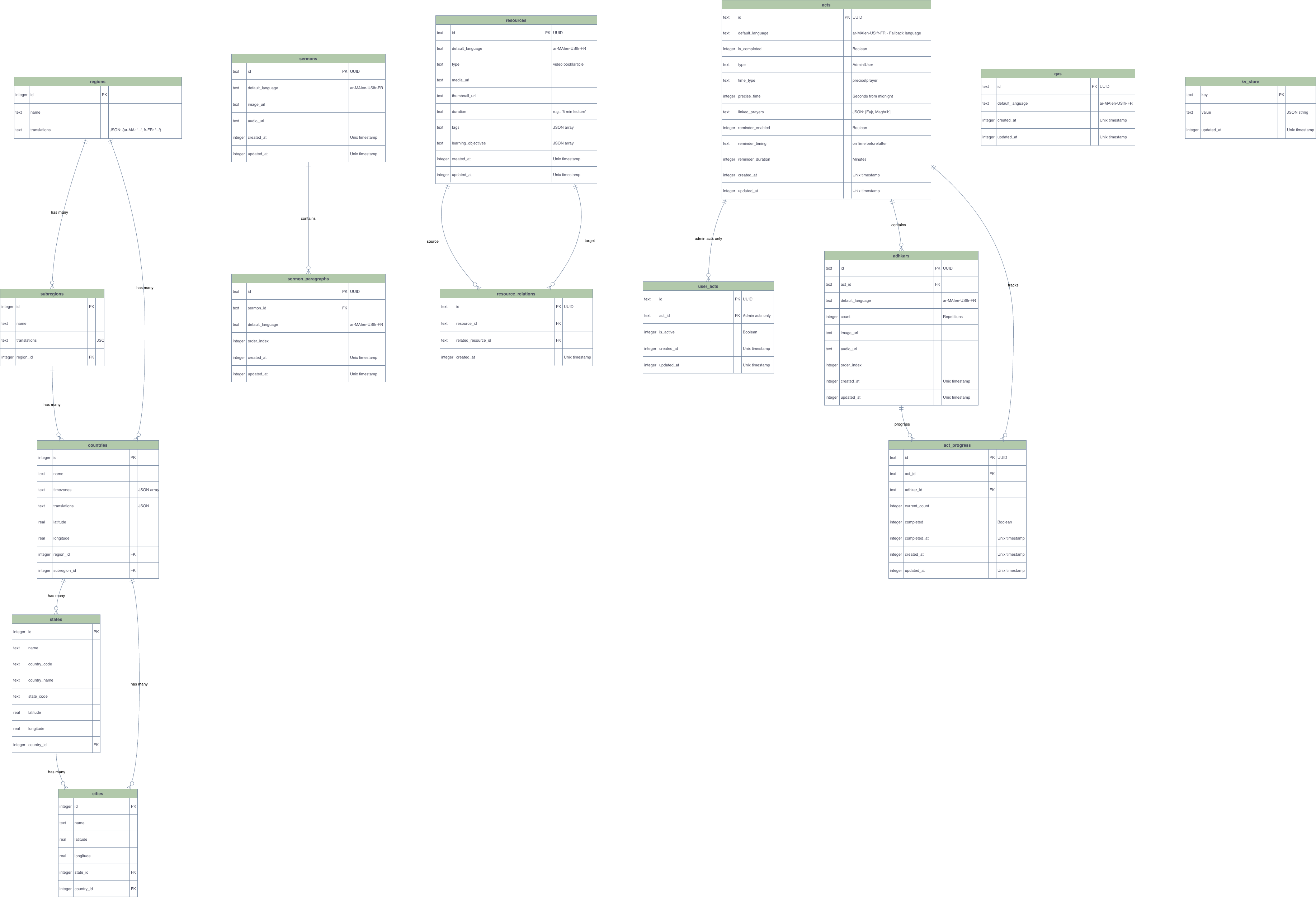
1. Entity Schema (Main Tables - No Translation Table)
All main tables with their columns. Translation relationships shown in diagram 2.
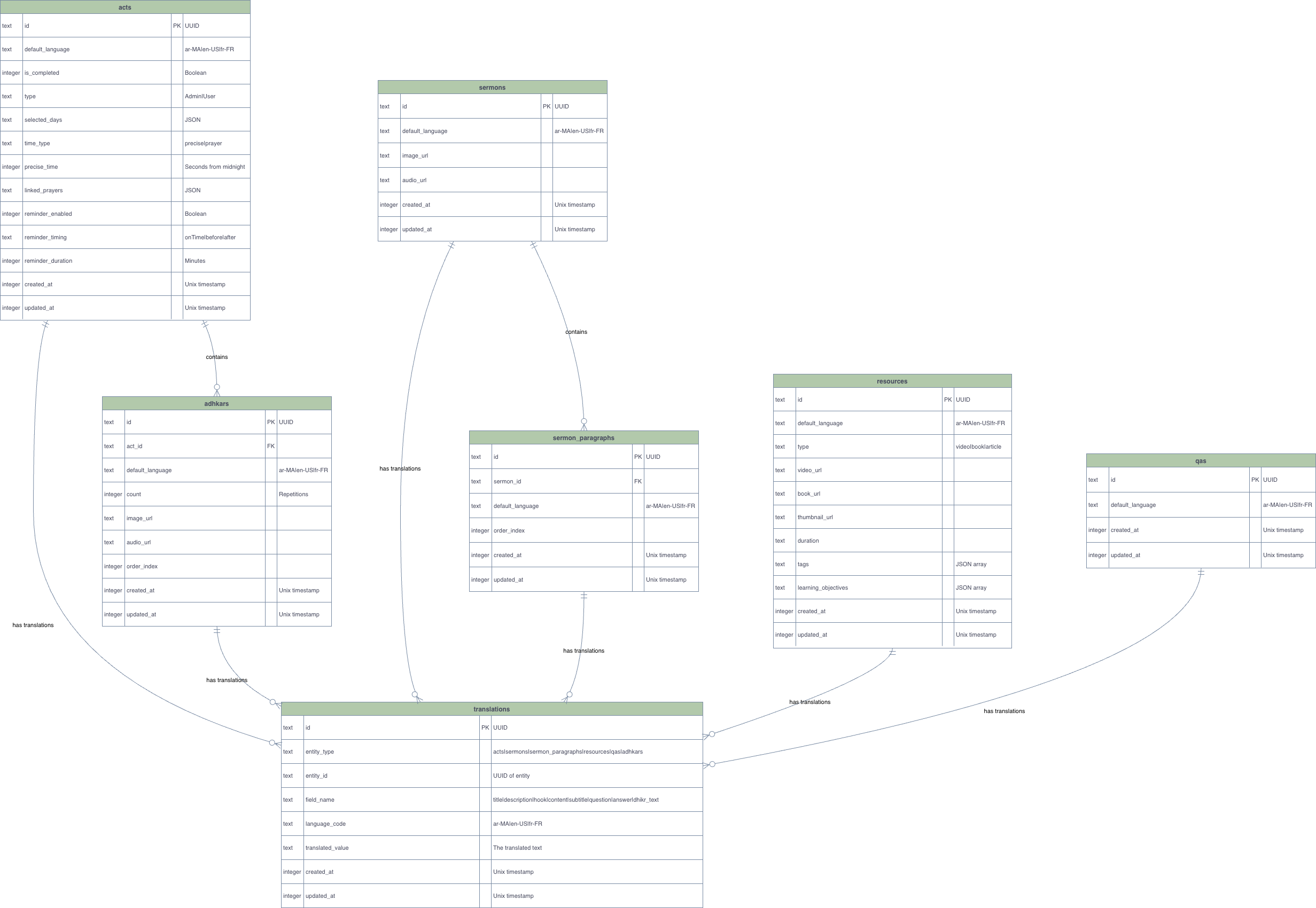
2. Translation Schema (Translation Relationships Only)
Shows how the global translations table relates to content tables.
Translation Strategy
- Location tables (
regions,countries,subregions): Use JSONtranslationscolumn - Content tables (
acts,sermons,resources,qas,adhkars,sermon_paragraphs): Use globaltranslationstable - Fallback chain: Requested language → Record's
default_language→ Global default (en-US)
Drizzle Query Examples
Basic Translation Query
import { db } from '@/src/db';
import { acts, translations } from '@/src/db/schemas';
import { eq, and, sql, inArray } from 'drizzle-orm';

// Get act title in specific language
async function getActTitle(actId: string, languageCode: string) {
  const result = await db
    .select({
      id: acts.id,
      title: translations.translatedValue,
    })
    .from(acts)
    .innerJoin(translations, and(
      eq(translations.entityType, 'acts'),
      eq(translations.entityId, acts.id),
      eq(translations.fieldName, 'title'),
      eq(translations.languageCode, languageCode)
    ))
    .where(eq(acts.id, actId))
    .limit(1);

  return result[0]?.title || null;
}
Helper Function: Reusable Translation Getter
// Generic helper for any entity type
async function getTranslatedValue(
  entityType: 'acts' | 'sermons' | 'resources' | 'qas' | 'adhkars' | 'sermon_paragraphs',
  entityId: string,
  fieldName: string,
  requestedLanguage: string,
  recordDefaultLanguage: string,
  globalDefaultLanguage: string = 'en-US'
): Promise<string | null> {
  // Try requested language first
  let translation = await db
    .select()
    .from(translations)
    .where(and(
      eq(translations.entityType, entityType),
      eq(translations.entityId, entityId),
      eq(translations.fieldName, fieldName),
      eq(translations.languageCode, requestedLanguage)
    ))
    .limit(1);

  if (translation[0]) return translation[0].translatedValue;

  // Fallback to record's default language
  if (recordDefaultLanguage && recordDefaultLanguage !== requestedLanguage) {
    translation = await db
      .select()
      .from(translations)
      .where(and(
        eq(translations.entityType, entityType),
        eq(translations.entityId, entityId),
        eq(translations.fieldName, fieldName),
        eq(translations.languageCode, recordDefaultLanguage)
      ))
      .limit(1);

    if (translation[0]) return translation[0].translatedValue;
  }

  return null;
}

// Usage example
const act = await db.select().from(acts).where(eq(acts.id, 'act-1')).limit(1);
const title = await getTranslatedValue(
  'acts',
  'act-1',
  'title',
  'fr-FR', // User's current language
  act[0].defaultLanguage, // Record's default (e.g., 'ar-MA')
  'en-US' // Global default
);
Design Notes
- Pure Translation Approach: All languages stored in
translationstable (including English) - Per-Record Fallback: Each record has
default_languagefor fallback when requested translation missing - Location Tables: Use JSON
translationscolumn (prepopulated data) - Content Tables: Use global
translationstable (dynamic content)
3. Scheduling & Event Bus Schema
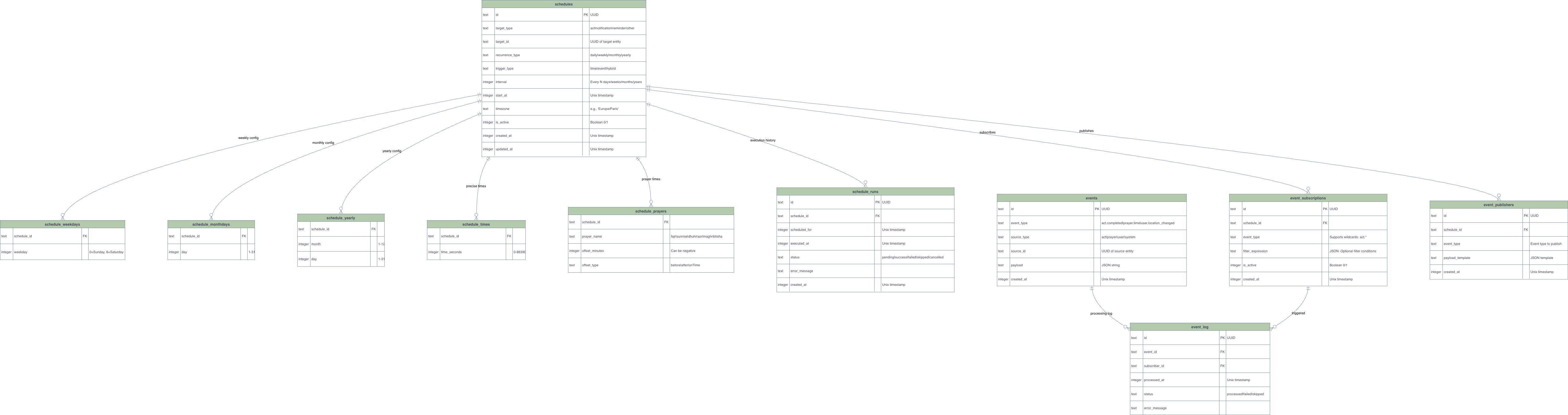
Scheduling Design Pattern Explanation
schedules {
  target_type: 'act' | 'notification' | 'reminder' | 'other'  // What to schedule
  target_id: integer                                           // ID of the target
  recurrence_type: 'daily' | 'weekly' | 'monthly' | 'yearly'  // How often
  interval: integer                                            // Every N periods
  start_at: integer                                            // When to start
  timezone: string                                             // Timezone context
  is_active: boolean                                           // Enable/disable
}// Example: Schedule on Monday, Wednesday, Friday
schedule_weekdays: [
{ schedule_id: 1, weekday: 1 }, // Monday
{ schedule_id: 1, weekday: 3 }, // Wednesday
{ schedule_id: 1, weekday: 5 }, // Friday
]Facade Method Signature
interface ScheduleExecution {
  schedule: Schedule;
  executionTime: number; // Unix timestamp in seconds
  targetType: 'act' | 'notification' | 'reminder' | 'other';
  targetId: number;
}
/**
 * Get all schedules that need to be executed within a time range
 *
 * @param rangeStart - Start of the time range (Unix timestamp in seconds)
 * @param rangeEnd - End of the time range (Unix timestamp in seconds)
 * @param timezone - Optional timezone for calculations (defaults to UTC)
 * @returns Array of schedule execution records with calculated execution times
 */
async function getSchedulesInRange(
  rangeStart: number,
  rangeEnd: number,
  timezone: string = 'UTC'
): Promise<ScheduleExecution[]>
Example : Get schedules for a specific time window (e.g., next 15 minutes)
const now = Math.floor(Date.now() / 1000);
const in15Minutes = now + (15 * 60); // 15 minutes later

const schedules = await getSchedulesInRange(now, in15Minutes);

// Execute immediately if any schedules found
if (schedules.length > 0) {
  console.log(`Executing ${schedules.length} schedules now...`);
  for (const execution of schedules) {
    await executeSchedule(execution);
  }
}
Example : Database structure - Prayers with schedule_id
Here's how prayers are linked to schedules:
// Schedule for Isha prayer (daily at 8:15 PM)
const ishaSchedule = {
  id: 5,
  target_type: 'reminder',  // Prayers use 'reminder' type
  target_id: 1,  // ID of the prayer reminder/notification
  recurrence_type: 'daily',
  interval: 1,
  start_at: 1234567890,
  timezone: 'Africa/Casablanca',
  is_active: true,
};

// Schedule times: Isha at 8:15 PM (73500 seconds = 20:15:00)
const ishaTimes = [
  { schedule_id: 5, time_seconds: 73500 },
];

// Act with schedule (daily Quran reading at 8:00 PM)
const quranActSchedule = {
  id: 8,
  target_type: 'act',
  target_id: 15,  // Act ID
  recurrence_type: 'daily',
  interval: 1,
  start_at: 1234567890,
  timezone: 'Africa/Casablanca',
  is_active: true,
};

const quranTimes = [
  { schedule_id: 8, time_seconds: 72000 }, // 20:00:00
];

// Usage: Get schedules for next hour (7:30 PM - 8:30 PM)
const now = Math.floor(Date.now() / 1000);
const oneHourLater = now + 3600;

const schedules = await getSchedulesInRange(now, oneHourLater);

// Results:
// - Isha prayer (schedule_id: 5) at 8:15 PM
// - Quran act (act_id: 15) at 8:00 PM