Update on Saheb Development Plan
Purpose of This Documentation
This presentation covers
sections that were not discussed in the last meeting, as well assections that required further research.
Key Points
This is the list of topics we will cover:
-
Database Technology
-
Logging Security and Strategy
-
ListeningProcessingto Kafka EventsTasks with BullMQ in NestJS -
OneSignal or Expo
-
Keycloak
-
Versioning Strategy
1. Database Technology
Choice: PostgreSQL
Why
-
Our data is structured, not dynamic, so a relational DB fits naturally.
-
We have complex queries, especially in the database translation system, which benefit from SQL capabilities.
-
Strong support for views and transactions ensures data consistency and simplifies reporting or multi-step operations
PostgresSQL (SQL) VS MongoDB (NoSQL)
Based on this amazon article this is the key differences:
| Feature | MongoDB (NoSQL) | PostgreSQL (Relational/ORDBMS) | Key Takeaways |
|---|---|---|---|
| Data Model | Stores data as JSON-like documents in collections. Flexible and can store unstructured, evolving, or dynamic data. | Stores data in tables with rows and columns. Structured, with strong data integrity and predefined schema. | MongoDB is for flexible, changing data; PostgreSQL is for structured, relational data. |
| Basic Unit of Storage | Document (JSON/BSON). Can include nested objects and arrays. | Row in a table, with defined column types. | MongoDB keeps all data for a record in one document; PostgreSQL stores data in structured rows. |
| Schema | Flexible, no enforced schema. | Strict predefined schema. | PostgreSQL ensures consistency; MongoDB allows easy changes but may risk inconsistency. |
| Query Language | MongoDB Query Language (MQL). Supports aggregations, projections, geospatial, text search. | SQL (Postgres variant), fully compatible with standard SQL. | SQL is standard and powerful for joins; MQL is document-oriented and different from SQL. |
| Transactions / ACID | Multi-document ACID transactions since v4.0, but less core than PostgreSQL. | Fully ACID-compliant, reliable for multi-step operations. | PostgreSQL is safer for critical operations requiring strong consistency. |
| Complex Queries / Joins | Limited joins; often requires embedding data (denormalization). | Supports multi-table joins and complex queries naturally. | MongoDB may repeat data; PostgreSQL handles relational data elegantly. |
| Views | Read-only views supported. | Full support for views, like saved queries. | PostgreSQL is stronger for reporting or abstracted queries. |
| Concurrency | Document-level atomicity, optimistic locking, MVCC for multiple users. | MVCC with data snapshots, flexible isolation levels, write-ahead logging (WAL). | Both handle concurrent access well; PostgreSQL is mature and battle-tested. |
| Scalability | Horizontal scaling (adding more machines) via sharding; can handle huge distributed datasets. | Partitioning, connection pooling, and load balancing; primarily vertical scaling (adding more power). | MongoDB excels for horizontal scaling; PostgreSQL scales well but often vertically. |
| Use Cases | CMS, streaming data, IoT, unstructured content, high-concurrency apps. | Data warehousing, ecommerce, transactional systems, structured data analytics. |
Choose based on the type of data and access patterns. (we have structured data) |
| Data Relationships | No predefined relationships; uses denormalization (embed related data). | Strong relationships via foreign keys; joins across tables. | PostgreSQL is better for relational-heavy systems; MongoDB works best with self-contained documents. |
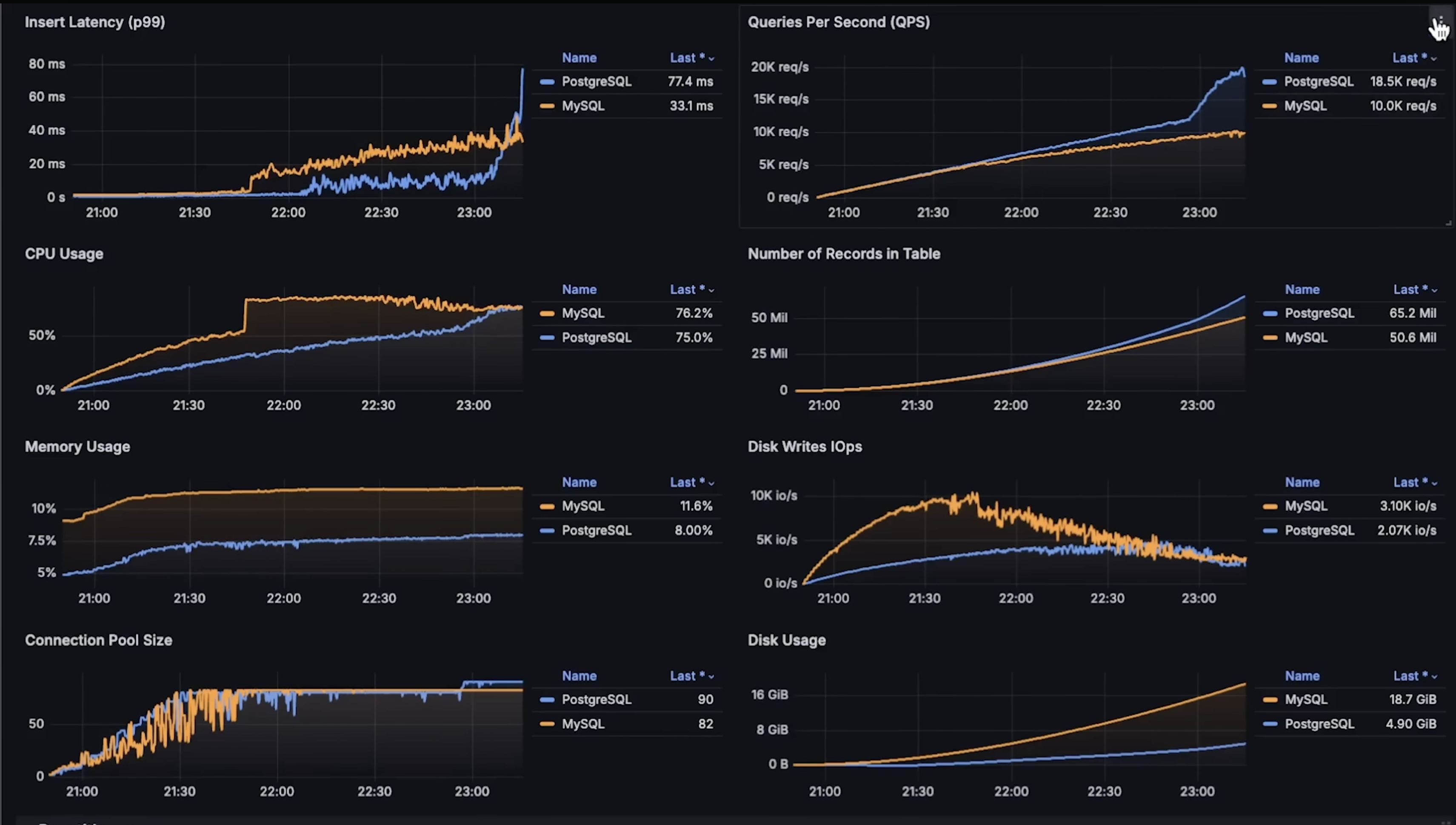
PostgresSQL vs Mysql Benchmarks
A greate video by Anton Putra called MySQL vs PostgreSQL Performance Benchmark.
First Benchmark overview (INSERT, SELECT)
Second Benchmark overview (Read Latency, Finding a Record and Joining Tables)
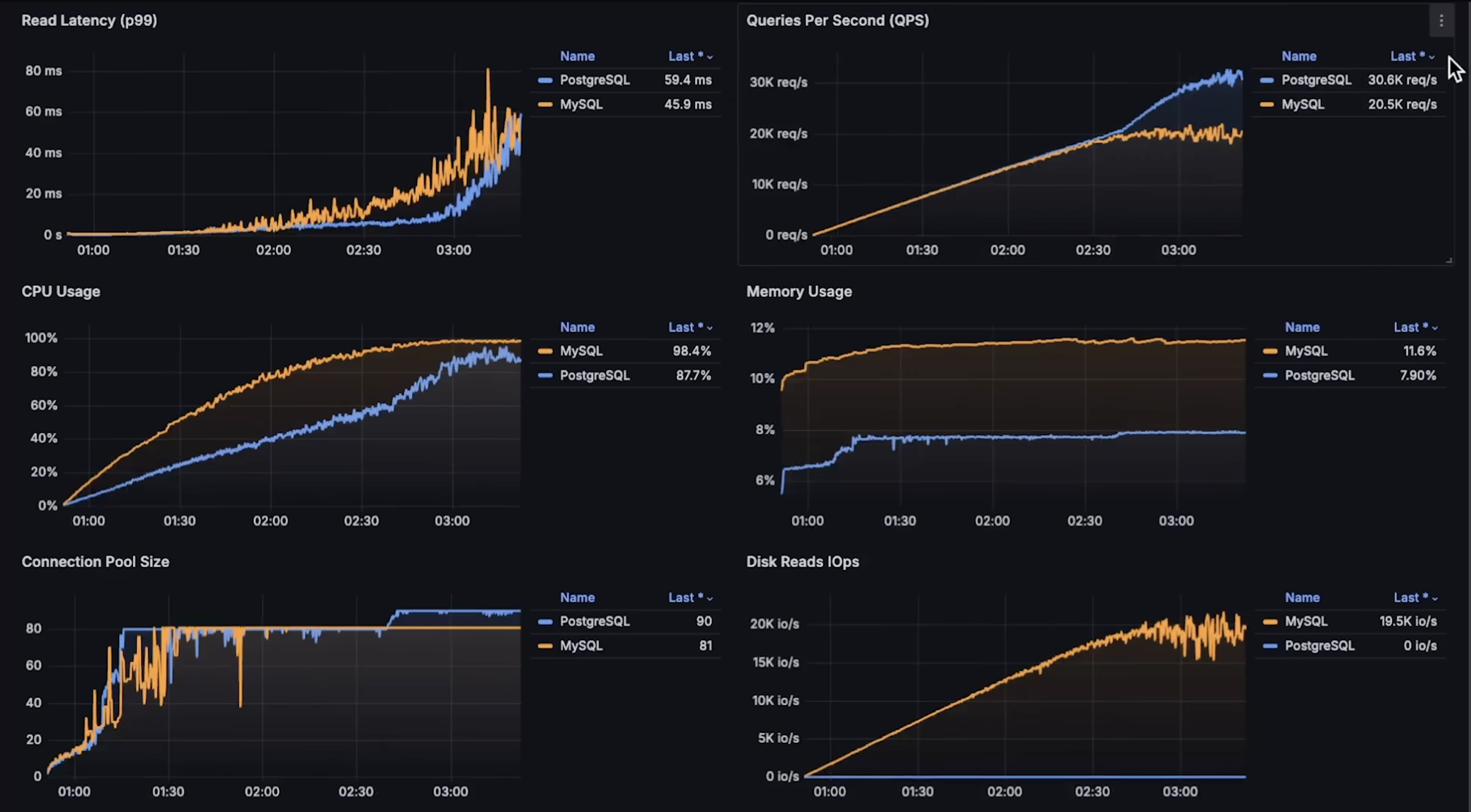
to see each graph details please see the Anton Putra video.
2. Logging Security and Strategies
based on this beautiful article these are the Logging Security and Strategies:
-
Establish Clear Logging Objectives
-
Decide why you are logging: what problems or goals are you trying to track.
-
Decide what to log: don’t try to log everything.
-
Make logs useful: for errors, include the error and the events leading up to it so issues can be fixed quickly.
-
-
Do use log levels correctly
-
Here's a summary of common levels and how they're typically used:
INFO: Significant and noteworthy business events.WARN: Abnormal situations that may indicate future problems.ERROR: Unrecoverable errors that affect a specific operation.FATAL: Unrecoverable errors that affect the entire program.
-
-
Do write meaningful log entries
-
The utility of logs is directly tied to the quality of the information they contain. Entries filled with irrelevant or unclear information will inevitably be ignored, undermining the entire purpose of logging.
-
Here's an example of a log entry without sufficient context:
{
  "timestamp": "2023-11-06T14:52:43.123Z",
  "level": "INFO",
  "message": "Login attempt failed"
}
And here's one with just enough details to piece together who performed the action, why the failure occurred, and other meaningful contextual data.
{
  "timestamp": "2023-11-06T14:52:43.123Z",
  "level": "INFO",
  "message": "Login attempt failed due to incorrect password",
  "user_id": "12345",
  "source_ip": "192.168.1.25",
  "attempt_num": 3,
  "request_id": "xyz-request-456",
  "service": "user-authentication",
  "device_info": "iPhone 12; iOS 16.1",
  "location": "New York, NY"
}
-
-
-
Protect Logs and Sensitive Information
- The mishandling of sensitive information in logs can have severe repercussions, as exemplified by the incidents at Twitter and GitHub in 2018.
Do not log sensitive data: passwords, API tokens, session tokens, credit card numbers, Social Security numbers, personal emails, etc.
Log references or IDs instead: for example, log a user ID instead of the email or password.
Example: Instead of logging the full password:
{ "userId": "user-123", "password": "********" }{ "userId": "user-123", "action": "login_failed" }3. Processing Tasks with BullMQ in NestJS
We need to perform background tasks, like sending prayer time notifications for example. BullMQ lets you offload work to a worker process so your main server stays responsive.
How the Process Works
1. A job is created (produced)
Your NestJS server decides that a task needs to happen (e.g., notify a user).
You add the job to a queue:
await this.prayerQueue.add('notify', { userId: 'user-123', prayerName: 'Fajr', time: '05:30', });2. The job waits in the queue
Jobs remain in the queue until a worker process is ready to process them.
This ensures the main server is never blocked, even if many jobs are created at once.
3. Single Worker Picks Up the Job
A worker process subscribes to the queue and executes jobs asynchronously:
@Processor('prayerQueue')
export class PrayerProcessor extends WorkerHost {
  async process(job: Job) {
    const { userId, prayerName, time } = job.data;
    console.log(`Sending prayer notification to ${userId}: ${prayerName} at ${time}`);
    // Push notification logic here
  }
}
4. Job Completion
Once the worker finishes, BullMQ marks the job as completed in Redis.
Failed jobs can retry automatically based on configuration.
Single-Worker Approach
The worker runs in the same server process as your main NestJS application.
This setup is simple and easy to implement, and is fine for low to moderate workloads.
Limitation:
If thousands of jobs arrive at once or jobs are heavy (CPU-intensive tasks, multiple API calls), a single worker can become a bottleneck.
Even though Node.js is non-blocking for I/O, the worker still handles jobs one at a time by default, and processing may take longer if overloaded.
Scaling with Multiple Workers
To handle high volumes of jobs, you can run additional worker processes On separate servers or containers.
BullMQ automatically distributes jobs across all workers connected to the same queue.
If 200k jobs are queued, each worker pulls jobs one by one, balancing the workload.
This ensures the main server remains responsive and all jobs are processed efficiently.
We can have:
Main NestJS server
Handles HTTP requests
Adds jobs to the queue
Optionally runs a worker for background tasks
Separate Worker server/process
Connects to the same queue in Redis
Processes jobs independently
Example with multiple workers:
// app.module.ts
import { Module } from '@nestjs/common';
import { BullModule } from '@nestjs/bullmq';
import { PrayerProcessor1 } from './prayer.processor';
import { PrayerService } from './prayer.service';

@Module({
  imports: [
    BullModule.forRoot({
      connection: { host: 'localhost', port: 6379 },
    }),
    BullModule.registerQueue({ name: 'prayerQueue' }),
  ],
  providers: [PrayerService, PrayerProcessor1],
})
export class AppModule {}
// prayer.processor.ts (Worker on main server)
import { Processor, WorkerHost } from '@nestjs/bullmq';
import { Job } from 'bullmq';

@Processor('prayerQueue')
export class PrayerProcessor1 extends WorkerHost {
  async process(job: Job) {
    console.log(`[Worker1 - Main Server] Notify ${job.data.userId}: ${job.data.prayerName}`);
  }
}
// prayer.service.ts (Job producer)
import { Injectable } from '@nestjs/common';
import { InjectQueue } from '@nestjs/bullmq';
import { Queue } from 'bullmq';

@Injectable()
export class PrayerService {
  constructor(@InjectQueue('prayerQueue') private prayerQueue: Queue) {}

  async scheduleNotification(userId: string, prayerName: string, time: string) {
    await this.prayerQueue.add('notify', { userId, prayerName, time });
  }
}
This server has no HTTP API, just listens to the queue and processes jobs.
// worker-server.ts
import { NestFactory } from '@nestjs/core';
import { Module } from '@nestjs/common';
import { BullModule, Processor, WorkerHost } from '@nestjs/bullmq';
import { Job } from 'bullmq';

@Processor('prayerQueue')
class PrayerProcessor2 extends WorkerHost {
  async process(job: Job) {
    console.log(`[Worker2 - Separate Server] Notify ${job.data.userId}: ${job.data.prayerName}`);
  }
}

@Module({
  imports: [
    BullModule.forRoot({ connection: { host: 'localhost', port: 6379 } }),
    BullModule.registerQueue({ name: 'prayerQueue' }),
  ],
  providers: [PrayerProcessor2],
})
class WorkerModule {}

async function bootstrap() {
  const app = await NestFactory.createApplicationContext(WorkerModule);
  console.log('Worker server started and listening to prayerQueue');
}
bootstrap();
Both workers connect to the same Redis-backed queue.
BullMQ assigns jobs dynamically so no two workers process the same job, and processing is parallelized.
Job Flow
Main server receives a request to schedule a notification.
It adds a job to prayerQueue in Redis.
BullMQ distributes the job to any available worker:
Worker1 (on main server)
Worker2 (on separate server/process)
Each job is executed only once, even if multiple workers are running concurrently.
Key Points
Single worker: simple, easy, good for small workloads.
Limitation: can become a bottleneck for heavy or high-volume tasks.
Multiple workers: scale horizontally; jobs are automatically distributed across workers.
Main NestJS server remains free to handle requests.
Jobs are stored persistently in Redis until processed.
Failed jobs can retry automatically, ensuring reliability.