Saheb App Design System

1. Purpose of This Documentation
This presentation explains the design and technical decisions behind our application features.
a. I will be covering:
1. Technology Stack
-
Backend framework
-
Web frontend framework
-
Mobile frontend framework
-
Database technology (PostgreSQL, MySQL, etc.)
-
UI libraries
-
Supporting libraries and tools (state management, datafetching, utilities)
2. Application Architecture & Project Structure
-
Backend folder structure
-
Frontend folder structure
-
Design patterns and development strategies
3. Localization & Language Support
-
Multi-language database translation strategy
-
RTL (Right-to-Left) support on web and mobile
-
Hijri calendar localization
4. Core Domain Logic
-
Qibla calculation logic
-
Prayer time calculation methods
-
Hijri time caulculation methods
5. Media Management
-
Audio resource handling (Sermon / موعظة)
-
Video hosting and streaming strategy
6. Notifications & Communication
-
Timezone-aware push notification system
-
Email notification architecture
-
Notification reliability and crash handling
-
Scheduling notificaiton with cron
8. Application Standards
-
Request logging
-
User event and activity tracking
-
Error and crash reporting
-
API versioning
b. How Each Section Is Documented
For every section in this documentation, I consistently answer the following questions:
-
What solution did Ichoose?
-
Why did I choose this solution?
-
I may cover what are the pros and cons of the solution for critical sections?
-
What alternative approaches I considered?
1. Technology Stack
a. Backend Framework
What solution did I choose?
I chose Nodejs + Expressjs + NestJS as the backend framework.
Why did I choose this solution?
- Team is more experienced with
- Widely used on our code base
-
Built with TypeScript by default
Pros
-
Clear module-based architecture
-
Strong TypeScript support
-
Easy integration with databases, authentication, and queues
-
Express Rich community
-
Supports modular development and scalability
-
Fits well for APIs serving web and mobile apps
-
One backend server for both mobile and web
Cons
-
Slightly more boilerplate
-
Integration Complexity with Some Legacy Libraries
Alternative Approaches
-
Express.js
-
Fastify
-
Laravel (PHP)
-
Spring Boot (Java)
b. Web Frontend Framework
What solution did I choose?
I chose Next.js using the App Directory.
Why did I choose this solution?
-
Built-in support for modern React features
-
File-based routing with the App Directory
-
Good integration with backend APIs
- Built-in layouts, and loading states, server errors handlings
Pros
-
Clear and scalable project structure
-
Server-side rendering and static generation
-
Strong support for SEO and web performance
-
Server Components
Cons
-
Some ecosystem libraries are still adapting
-
Build & Deployment Complexity
-
Rapidly Changing Features
Alternative Approaches
-
React ( Vite )
-
React (Tanstack start )
-
Nuxt.js
-
Angular
c. Mobile Frontend Framework
What solution did I choose?
I chose React Native with Expo.
Why did I choose this solution?
-
Allows building iOS Android apps and web from a single codebase
- Quick testing on simulators, emulators, and real devices
-
Built-in support for push notifications, sensors, and device APIs
-
Large community and ecosystem
- Deployment built-in (EAS Hosting)
- Routing and Authentification built in
- Assets management
- AI intergration (expo mcp server)
Cons
-
Some native modules require custom development (Ejecting from Expo)
Alternative Approaches
-
Pure React Native (without Expo)
-
Flutter
-
Native iOS (Swift) / Android (Kotlin) development
d. Database Technology
What solution did I choose?
I chose PostgreSQL as the database for our application.
Why did I choose this solution?
- Team is more experienced with
- Good ecosystem and tooling support
-
Reliable and stable relational database
-
Widely used in the industry with large community and resources
-
Works well with TypeORM for Nestjs integration
Pros
-
Good ecosystem and tooling support
-
Open-source and actively maintained
-
Supports advanced features like JSON, full-text search, and indexes
-
Strong support for transactions
Cons
-
Can be more complex to set up than simpler databases (like SQLite)
-
Overkill for very small projects
e. UI Libraries
1. Web Frontend UI Approach
What solution did I choose?
I chose shadcn/ui integrated with Tailwind CSS, and Figma designs for reference.
Why did I choose this solution?
- Tailwind provide CSS utility classes to speed up development, so instead of writing custom CSS files, I can style components directly using small, reusable classes
- Without Tailwind (Traditional CSS):
- With Tailwind:
- Without Tailwind (Traditional CSS):
-
Provides a ready-to-use component library built on Tailwind CSS
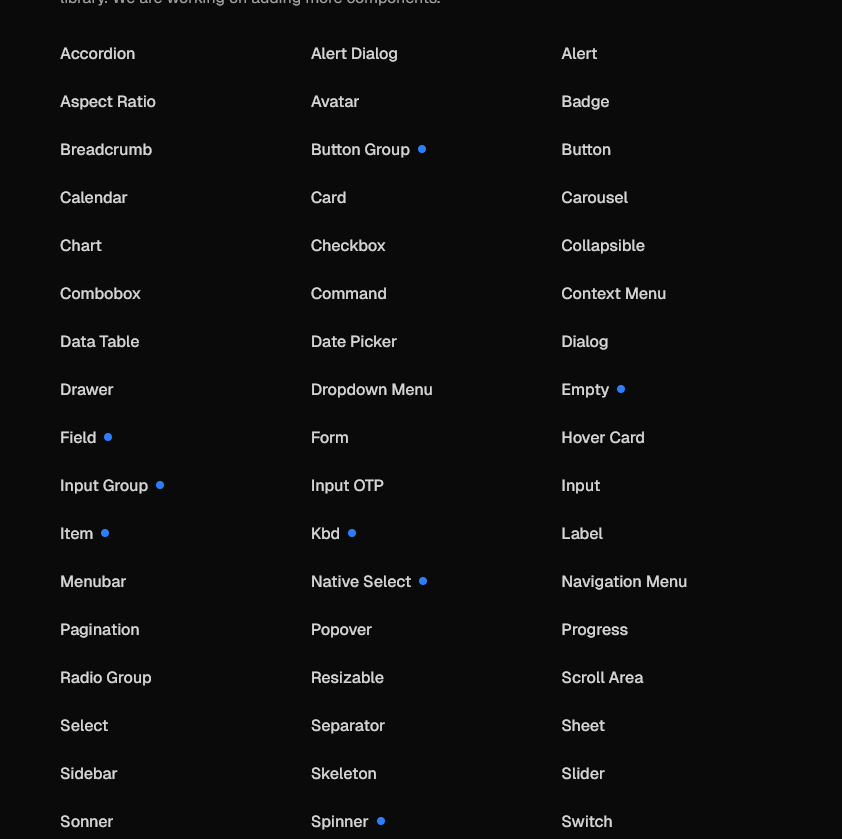
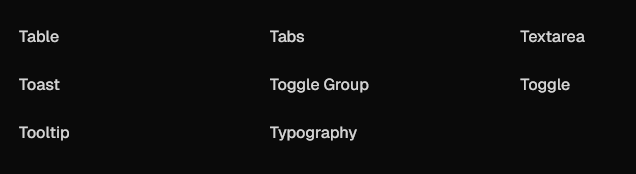
- Open Code: The top layer of your component code is open for modification:
- Other UI libraries:
- Shadcn:
-
import * as React from "react"
import { Slot } from "@radix-ui/react-slot"
import { cva, type VariantProps } from "class-variance-authority"

import { cn } from "@/lib/utils"

const buttonVariants = cva(
  "inline-flex items-center justify-center gap-2 whitespace-nowrap rounded-md text-sm font-medium transition-all disabled:pointer-events-none disabled:opacity-50 [&_svg]:pointer-events-none [&_svg:not([class*='size-'])]:size-4 shrink-0 [&_svg]:shrink-0 outline-none focus-visible:border-ring focus-visible:ring-ring/50 focus-visible:ring-[3px] aria-invalid:ring-destructive/20 dark:aria-invalid:ring-destructive/40 aria-invalid:border-destructive",
  {
    variants: {
      variant: {
        default: "bg-primary text-primary-foreground hover:bg-primary/90",
        destructive:
          "bg-destructive text-white hover:bg-destructive/90 focus-visible:ring-destructive/20 dark:focus-visible:ring-destructive/40 dark:bg-destructive/60",
        outline:
          "border bg-background shadow-xs hover:bg-accent hover:text-accent-foreground dark:bg-input/30 dark:border-input dark:hover:bg-input/50",
        secondary:
          "bg-secondary text-secondary-foreground hover:bg-secondary/80",
        ghost:
          "hover:bg-accent hover:text-accent-foreground dark:hover:bg-accent/50",
        link: "text-primary underline-offset-4 hover:underline",
      },
      size: {
        default: "h-9 px-4 py-2 has-[>svg]:px-3",
        sm: "h-8 rounded-md gap-1.5 px-3 has-[>svg]:px-2.5",
        lg: "h-10 rounded-md px-6 has-[>svg]:px-4",
        icon: "size-9",
        "icon-sm": "size-8",
        "icon-lg": "size-10",
      },
    },
    defaultVariants: {
      variant: "default",
      size: "default",
    },
  }
)

function Button({
  className,
  variant = "default",
  size = "default",
  asChild = false,
  ...props
}: React.ComponentProps<"button"> &
  VariantProps<typeof buttonVariants> & {
    asChild?: boolean
  }) {
  const Comp = asChild ? Slot : "button"

  return (
    <Comp
      data-slot="button"
      data-variant={variant}
      data-size={size}
      className={cn(buttonVariants({ variant, size, className }))}
      {...props}
    />
  )
}

export { Button, buttonVariants }
-
- Distribution: A flat-file schema and command-line tool make it easy to distribute components.
-
npx shadcn@latest add button
-
- AI-Ready: Open code for LLMs to read, understand, and improve (mcp server).
-
{
  "registries": {
    "@acme": "https://acme.com/r/{name}.json"
  }
}
-
-
Figma designs give a visual reference for UI consistency
- Huge ecosystem built around shadcn.
-
Fits well with React and Next.js
- Very customizable :
- you can change the whole app theme by changing only globall.css file :
- change component source code.
Pros
-
Lightweight and modern styling approach
Cons
-
Learning curve for Tailwind if new to utility-first CSS
Alternative Approaches
-
Material-UI (MUI)
-
Ant Design
-
Chakra UI
-
Custom components from scratch
1. Mobile UI Approach:
What solution did I choose?
I chose not to use any mobile component library.
I use NativeWind for styling, along with Figma MCP, Figma Make, and Figma Dev Tools.
Why did I choose this solution?
- The app uses a fully custom UI designed in Figma, so prebuilt component libraries are not a good fit
-
NativeWind works like Tailwind CSS, making styling simple and consistent
-
Utility-based styling works well with LLMs for generating and adjusting UI code
-
Figma MCP and Figma Make help convert design decisions into implementation guidance
-
Figma Dev Tools allow developers and LLMs to inspect spacing, colors, and layout accurately
- NativeWind allows theme-based styling (colors, spacing, dark mode)
Cons
-
No ready-made components out of the box
-
More manual work during initial development
f. Supporting Libraries & Tools
Zustand (State Management)
What solution did I choose?
I chose Zustand for global state management.
Why did I choose this solution?
-
Simple and lightweight API
-
Minimal boilerplate compared to other state managers
-
Works well with React and React Native
Cons
Less structured than Redux
Not ideal for very complex global state
Alternative Approaches
-
Redux Toolkit
-
Jotai
Recoil
React Query (Server State & Data Fetching)
What solution did I choose?
I chose React Query for data fetching and server state management.
Why did I choose this solution?
-
Handles caching, loading, and error states automatically
- provide all request states by default (
isPending, isError, isFetching , isLoadin,isFetching)
.Reduces manual API state handling
Works well with REST APIs\APIs
Improves app performance
Simplifies async data logic
Cons
Additional abstraction to learn
Not needed for very simple apps
Alternative Approaches
-
SWR
-
Manual data fetching
-
Redux Toolkit Query
Axios (HTTP Client)
What solution did I choose?
I chose Axios for making HTTP requests.
Why did I choose this solution?
-
Simple
and consistentAPI -
Supports request and response
interceptorsinterceptors. (eg for handling access tokens and refresh tokens) -
Works well with authentication and error handling
Pros
Easy to configure
Good error handling
Widely adopted
Cons
Slightly larger than native fetch
Another dependency to maintain
Alternative Approaches
-
Native fetch API
-
Ky
Postman (API Testing)
What solution did I choose?
I chose Postman for API testing and debugging.
Why did I choose this solution?
-
Easy to test APIs during development
- Easy
and collections with the teamHelpstovalidatesharebackendrequestsendpoints -
Supports environments and collections
Pros
-
Simple and visual API testing
-
Useful for collaboration
-
Saves request history
Cons
-
Not part of production code
-
Can become outdated if not maintained
Alternative Approaches
-
InsomniaSwagger
Why Postman Over Swagger:
Collaboration & Manual Collection Import
Easy to share requests and collections with the team
cURLEnvironment Variables
Supports dev, staging, prod easily for testing
Ease of Use
Postman is simpler and more familiar to the team
Swagger is mainly for documentation and simple API testing, while Postman is primarily for API testing and debugging
next-intl (Internationalization)
What solution did I choose?
I chose next-intl for internationalization in the web app.
Why did I choose this solution?
-
Designed specifically for Next.js
-
Supports server and client components
-
Easy locale-based routing
Pros
Good integration with App Directory
Clean API
Strong performance
Cons
Next.js-specific
Requires structured translation files
Alternative Approaches
-
react-i18next
FormatJS
React Hook Form + Zod (Forms & Validation)
What solution did I choose?
I chose React Hook Form with Zod for form handling and validation.
Why did I choose this solution?
-
DeclarativeCleanandvalidationperformantlogicform
Good developer experience
Schema-based validation
Strong TypeScript support
Pros
Minimal re-renders
Clean validation logic
Good developer experience
Cons
Requires learning two libraries
Schema definitions add extra setup
Alternative Approaches
-
Formik + Yup
-
Native form handling
Moment.js (Date & Time Handling)
What solution did I choose?
I chose Moment.js for handling and formatting dates and times.
Why did I choose this solution?
-
Simplifies date formatting and manipulation
-
Easy to use for common date operations
-
Widely known and documented
Pros
Very easy date formatting
Handles time zones and localization
Large ecosystem and examples
Cons
Large bundle size
Considered legacy for new projects
Alternative Approaches
-
Day.js
-
date-fns
Luxon