Sahib Update
How Qibla Calculation & Compass Work
1. Qibla Direction Calculation
Library Used
- adhan — JavaScript library for Islamic calculations
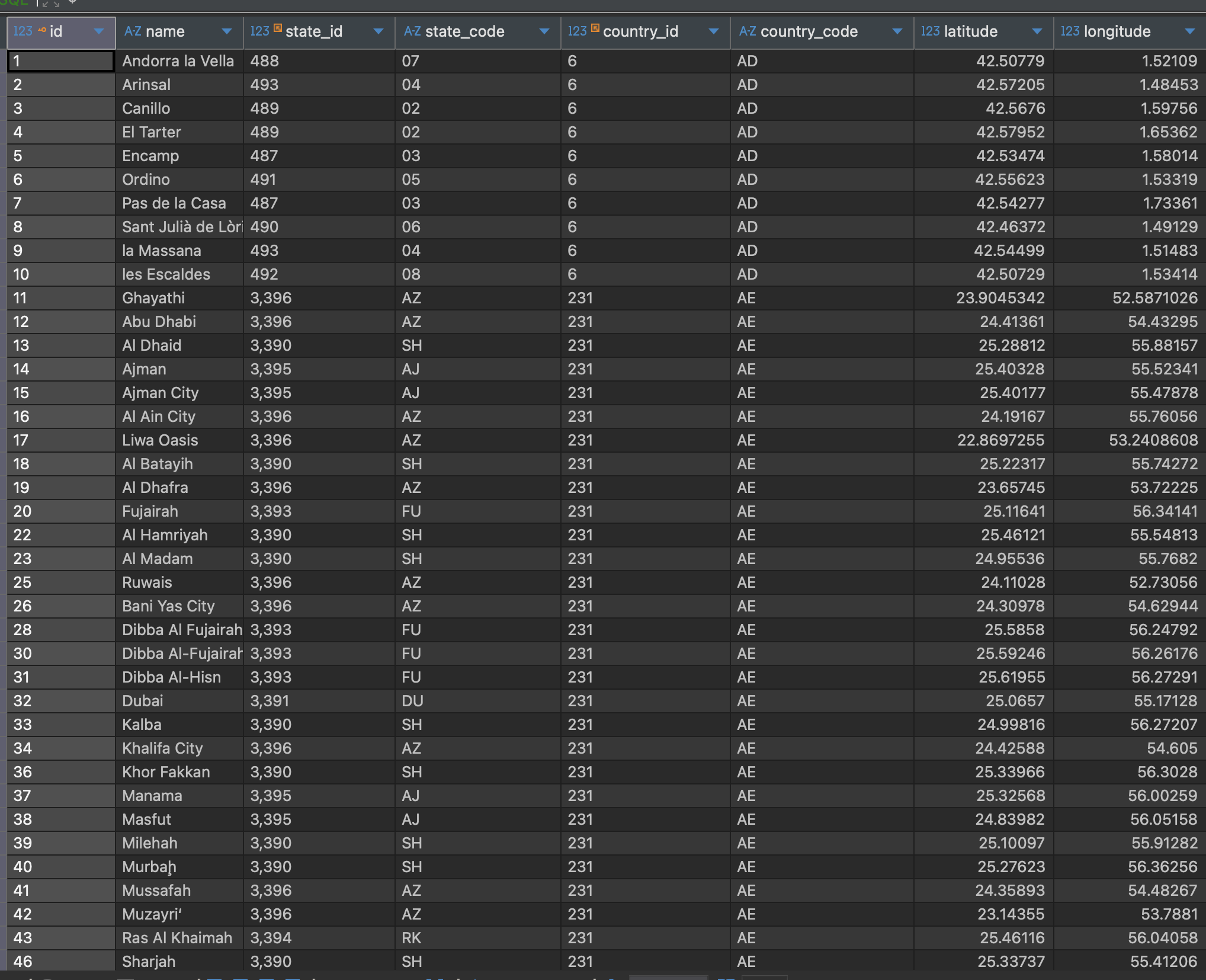
export const findNearestCity = async (
  latitude: number,
  longitude: number,
): Promise<NearestCityResult> => {
  const nearest = await db.query.cities.findFirst({
    columns: { id: true, name: true },
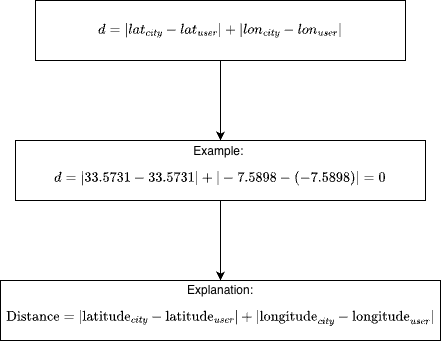
    orderBy: sql`abs(${cities.latitude} - ${latitude}) + abs(${cities.longitude} - ${longitude})`,
  });

  return nearest || null;
};
How It Works
const coordinates = new Coordinates(latitude, longitude);
const qiblaAngle = Qibla(coordinates); // Returns angle in degrees (0-360)
2. Device Heading (Compass)
Library Used
- expo-location — Expo’s location services
How It Works
Location.watchHeadingAsync((heading) => {
  const headingValue = heading.trueHeading > 0
    ? heading.trueHeading    // True North (GPS-based)
    : heading.magHeading;    // Magnetic North (compass-based)

  setDeviceHeading(headingValue); // 0-360 degrees
});
- Listens to the device’s magnetometer/compass
- Returns the device’s heading (0–360°)
- trueHeading: GPS-based (more accurate, requires GPS)
- magHeading: magnetic compass (works without GPS)
3. Compass Rotation Formula
targetRotation = -deviceHeading

currentNormalized = normalizeAngle(currentRotation)  // 0-360
targetNormalized = normalizeAngle(targetRotation)    // 0-360

diff = targetNormalized - currentNormalized
if (diff > 180) diff -= 360   // shortening the movement speed
if (diff < -180) diff += 360  // shortening the movement speed

finalTarget = currentRotation + diff
Why negative?
- When device points North (0°), compass should show North at top (0° rotation)
- When device rotates 90° East, compass rotates -90° to keep North at top
Compass Circle
- Rotates with device movement
- Formula: rotate(-deviceHeading)
- Keeps North at the top visually
Qibla Arrow
- Stays fixed, pointing to qibla direction
- Formula: rotation = qiblaDirection (e.g., 58°)
- Shows the direction to Mecca relative to the compass
Design patterns in prayer-times service
1. Template Method Pattern
What it is: The base class defines the algorithm steps, and subclasses fill in the specific parts.
export interface PrayerTimeInput {
  coordinates: Coordinates;
  date?: Date;
  timezone: string;
  format?: string;
  adjustments?: PrayerAdjustments;
}
export interface PrayerTimesResult {
  fajr: Date;
  sunrise: Date;
  dhuhr: Date;
  asr: Date;
  maghrib: Date;
  isha: Date;
  formatted?: FormattedPrayerTimes;
}

export interface FormattedPrayerTimes {
  fajr: string;
  sunrise: string;
  dhuhr: string;
  asr: string;
  maghrib: string;
  isha: string;
}
// Base class defines the template
abstract class PrayerTimeCalculator {
  public calculate(input: PrayerTimeInput): PrayerTimesResult {
    // Step 1: Prepare (subclass implements)
    const params = this.prepareCalculationParameters(input);

    // Step 2: Apply adjustments (subclass implements)
    const adjustedParams = this.applyAdjustments(params, input.adjustments);

    // Step 3: Calculate (subclass implements)
    const rawTimes = this.calculateRawPrayerTimes(input, adjustedParams);

    // Step 4 & 5: Common steps (base class handles)
    const timezoneAware = this.convertToTimezone(rawTimes, input.timezone);
    const formatted = this.formatPrayerTimes(timezoneAware, input.timezone);

    return { ...timezoneAware, formatted };
  }
}
Analogy: A recipe template where steps 1–3 are fixed, and steps vary by method
What it is: Translates one interface to another so different systems can work together.
Example:
- AdhanAdapter wraps the Adhan library to match the generic interface.
/**
 * Adapter for Adhan library
 * This adapter handles all Adhan-specific logic, making the calculator generic
 */
export class AdhanAdapter {
  /**
   * Create Adhan Coordinates from generic coordinates
   */
  static createCoordinates(input: PrayerTimeInput): AdhanCoordinates {
    return new AdhanCoordinates(input.coordinates.latitude, input.coordinates.longitude);
  }


  /**
   * Calculate prayer times using Adhan library
   */
  static calculatePrayerTimes(
    input: PrayerTimeInput,
    params: CalculationParameters,
  ): RawPrayerTimes {
    const coordinates = AdhanAdapter.createCoordinates(input);
    const date = input.date || new Date();
    const prayerTimes = new AdhanPrayerTimes(coordinates, date, params);

    return {
      fajr: prayerTimes.fajr,
      sunrise: prayerTimes.sunrise,
      dhuhr: prayerTimes.dhuhr,
      asr: prayerTimes.asr,
      maghrib: prayerTimes.maghrib,
      isha: prayerTimes.isha,
    };
  }
}
3. Facade Pattern
What it is: A simple interface that hides complexity behind the scenes.
/**
 * Factory function to create a calculator instance based on method name
 * @param methodName - Name of the calculation method (enum or 'Dummy' string)
 * @returns Calculator instance
 */
export const createCalculator = (methodName: CalculationMethodName | 'Dummy'): PrayerTimeCalculator => {
  switch (methodName) {
    case CalculationMethodName.MuslimWorldLeague:
      return new MuslimWorldLeagueCalculator();
    case CalculationMethodName.Egyptian:
      return new EgyptianCalculator();
      //....
    default:
      throw new Error(`Unknown calculation method: ${methodName}`);
  }
};

/**
 * Convenience function to calculate prayer times
 * @param methodName - Name of the calculation method
 * @param input - Prayer time calculation input
 * @returns Prayer times result
 */
export const calculatePrayerTimes = (
  methodName: CalculationMethodName,
  input: PrayerTimeInput,
): PrayerTimesResult => {
  const calculator = createCalculator(methodName);
  return calculator.calculate(input);
};
Usage
export enum CalculationMethodName {
  MuslimWorldLeague = 'MuslimWorldLeague',
  Egyptian = 'Egyptian',
  Karachi = 'Karachi',
  UmmAlQura = 'UmmAlQura',
  Dubai = 'Dubai',
  MoonsightingCommittee = 'MoonsightingCommittee',
  NorthAmerica = 'NorthAmerica',
  Kuwait = 'Kuwait',
  Qatar = 'Qatar',
  Singapore = 'Singapore',
  Tehran = 'Tehran',
  Turkey = 'Turkey',
}
const prayerTimesResult = calculatePrayerTimes(CalculationMethodName.MuslimWorldLeague, {
        coordinates: {
          latitude: state.latitude,
          longitude: state.longitude,
        },
        date: new Date(),
        timezone: state.timezone,
        format: 'h:mm A',
        adjustments: state.prayerAdjustments,
      });
Data Storage
I migrated from WatermelonDB
migrated from WatermelonDB to Drizzle ORM because:
- Prepopulated database support: WatermelonDB doesn't support prepopulated databases, which we need for cities data.
- Migration limitations: No built-in support for renaming or deleting columns, even using raw sql is pain.
- API extensibility: Hard to extend or customize.
- Documentation: Poor and outdated.
Drizzle ORM addresses these and works well with Expo SQLite.
Drizzle Features
1. Database instance (drizzle)
Feature: Creates a Drizzle ORM instance wrapping SQLite
import { drizzle } from 'drizzle-orm/expo-sqlite';
import { openDatabaseSync } from 'expo-sqlite';
import * as schema from './schemas';

const expoDb = openDatabaseSync('sahib.db', {
  enableChangeListener: true,
});

export const db = drizzle(expoDb, { schema });
Usage: Use db for all database operations.
2. Table definition (sqliteTable)
Feature: Defines SQLite tables with type-safe columns
import { integer, real, sqliteTable, text } from 'drizzle-orm/sqlite-core';

export const cities = sqliteTable('cities', {
  id: integer('id').primaryKey({ autoIncrement: true }),
  name: text('name').notNull(),
  latitude: real('latitude').notNull(),
  longitude: real('longitude').notNull(),
});
Column types used:
- integer() - Integer numbers
- text() - Text strings
- real() - Floating point numbers
3. Query builder API (db.query)
Feature: Type-safe query builder with relation support
// Query
const cityWithCountry = await db.query.cities.findFirst({
  where: (cityTable, { eq }) => eq(cityTable.id, cityId),
  columns: {
    name: true,
    latitude: true,
  },
  with: {
    country: {
      columns: {
        name: true,
        timezones: true,
      },
    },
    state: {
      columns: {
        name: true,
      },
    },
  },
});
7. Raw SQL (sql template tag)
import { sql } from 'drizzle-orm';

const results = await db.query.cities.findMany({
  where: sql`lower(${cities.name}) LIKE lower(${`%${searchQuery}%`})`,
  limit: 40,
});
8. Reactive queries (useLiveQuery)
import { useLiveQuery } from 'drizzle-orm/expo-sqlite';

function CityList() {
  const { data, updatedAt } = useLiveQuery(
    getCitiesQuery(searchQuery, 40),
    [searchQuery], // Dependencies - re-runs when these change
  );

  // data automatically updates when database changes!
  return (
    <FlatList
      data={data ?? []}
      renderItem={({ item }) => <CityItem city={item} />}
    />
  );
}
Features:
- Auto-updates when database changes
- Returns data and updatedAt
- Re-runs when dependencies change
10. Migrations (useMigrations)
import { useMigrations } from 'drizzle-orm/expo-sqlite/migrator';
import migrations from '@/src/db/migrations/migrations';

function MigratorComponent() {
  const sqlite = useSQLiteContext();
  const db = drizzle(sqlite, { schema });

  // Automatically runs pending migrations on app start
  useMigrations(db, migrations);

  return null;
}
11. Migration generation (drizzle-kit)
# Generate migrations from schema changes
npx drizzle-kit generate

# This creates SQL migration files in src/db/migrations/
12. Database studio (useDrizzleStudio)
Feature: Visual database browser (development only)
Expo SQLite Key-Value Storage
import Storage from 'expo-sqlite/kv-store';

Storage.setItemSync('key', 'value');
const value = Storage.getItemSync('key');

// Asynchronous API
await Storage.setItem('key', 'value');
const value = await Storage.getItem('key');
2. Wrapper implementation
import Storage from 'expo-sqlite/kv-store';

export const storage = {
  // ==================== Synchronous API ====================

  setString: (key: string, value: string): void => {
    Storage.setItemSync(key, value);
  },

  getString: (key: string): string | null => {
    return Storage.getItemSync(key);
  },

  setBoolean: (key: string, value: boolean): void => {
    Storage.setItemSync(key, String(value));
  },

  getBoolean: (key: string): boolean | null => {
    const value = Storage.getItemSync(key);
    if (value === null) return null;
    return value === 'true';
  },

  setNumber: (key: string, value: number): void => {
    Storage.setItemSync(key, String(value));
  },

  getNumber: (key: string): number | null => {
    const value = Storage.getItemSync(key);
    if (value === null) return null;
    const num = Number(value);
    return isNaN(num) ? null : num;
  },

  remove: (key: string): void => {
    Storage.removeItemSync(key);
  },

  clear: (): void => {
    Storage.clearSync();
  },

  // ==================== Asynchronous API ====================

  setStringAsync: async (key: string, value: string): Promise<void> => {
    await Storage.setItem(key, value);
  },

  getStringAsync: async (key: string): Promise<string | null> => {
    return await Storage.getItem(key);
  },

  // ... similar async methods for boolean, number, remove, clear
};
How Cities Are Handled
Prepopulated database structure
What's prepopulated:
- Cities with coordinates (latitude/longitude)
- Countries with timezones and translations
- States, regions, and subregions
- Relationships between all entities
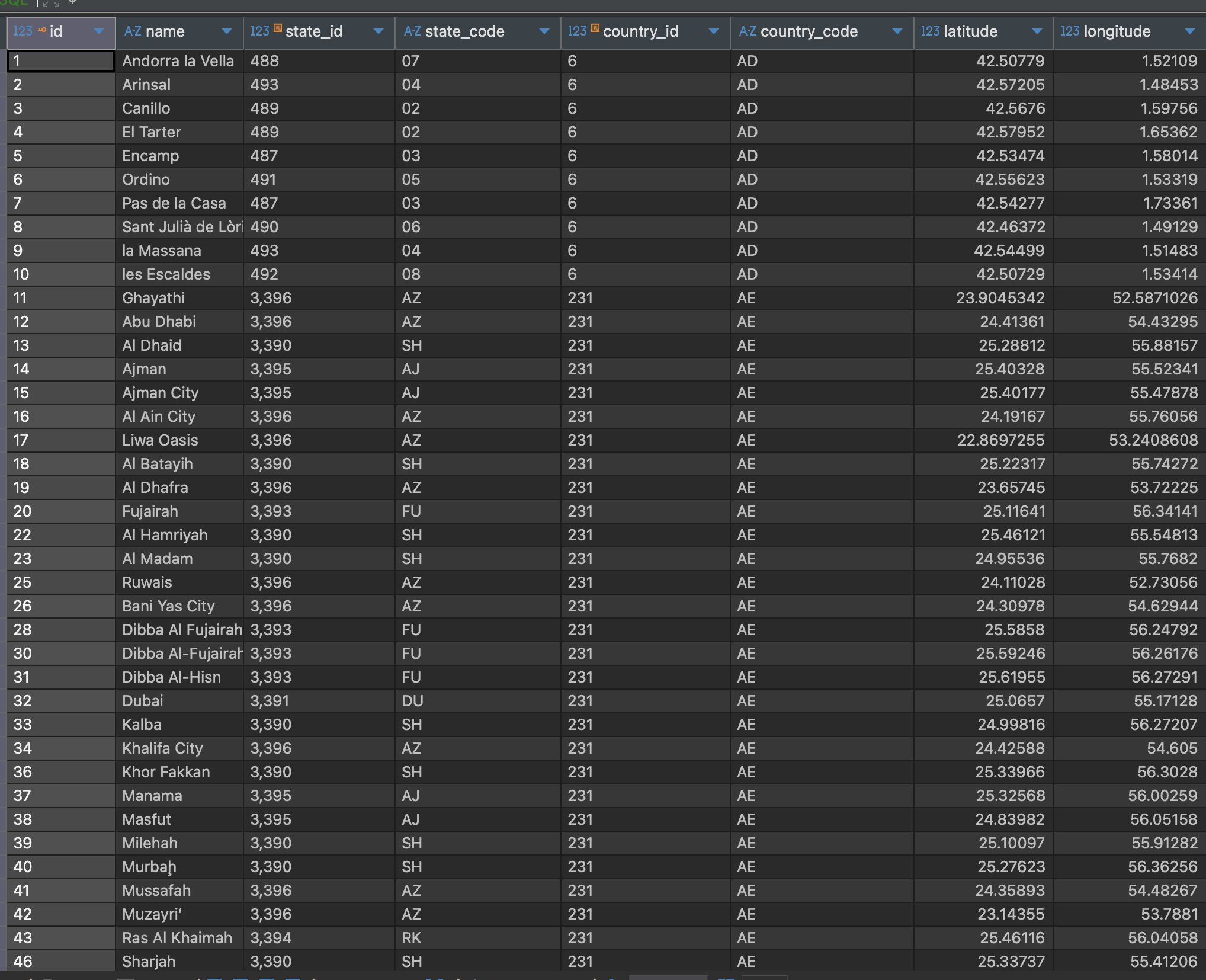
Nearest city detection
export const findNearestCity = async (
  latitude: number,
  longitude: number,
): Promise<NearestCityResult> => {
  const nearest = await db.query.cities.findFirst({
    columns: { id: true, name: true },
    orderBy: sql`abs(${cities.latitude} - ${latitude}) + abs(${cities.longitude} - ${longitude})`,
  });

  return nearest || null;
};
Sahib Data Model
not finished